Kreative Social Walls für jeden Anlass
Stöbere durch unsere Auswahl an vorgefertigten Templates und kopiere einfach den CSS-Code, um ihn für deine eigene Wall zu nutzen.



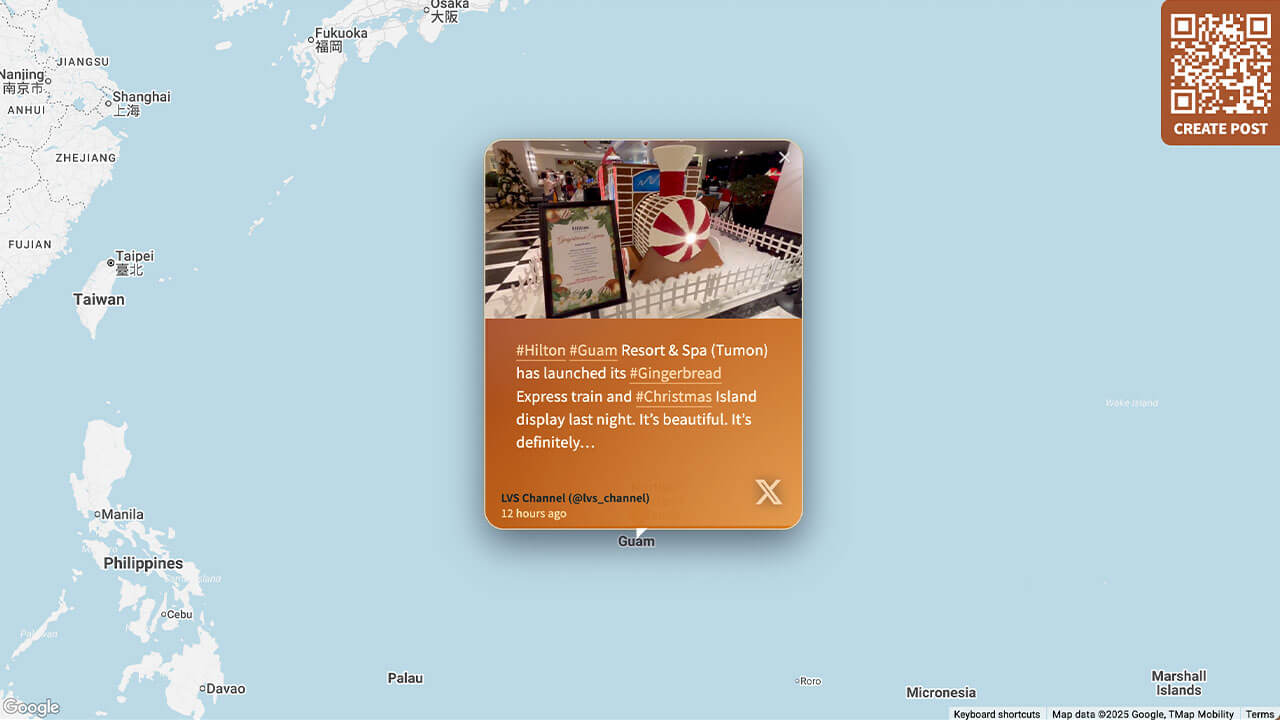
Layout Tourismus
Perfekt für Unternehmen aus der Gastronomie- und Tourismusbranche mit Standorten auf der ganzen Welt.
Highlights der Anpassung:
- Markenspezifische Farbverläufe auf Kacheln
- Animiertes Leuchten und Hover-Effekte bei Bildern/Videos
- Individuelle Standort-Pins
So geht's
Gehe zu Walls.io > Setup > Design.
Zur Wall gehenStelle sicher, dass du das Karten-Layout ausgewählt hast, blende die Kopfzeile aus und wähle das Farbschema „Light“ sowie den Kartenstil „Light“.
Kopiere den folgenden CSS-Schnipsel in das Feld für benutzerdefiniertes CSS.
/******************************************************
  WALLS.IO — "Tourism" Theme
  • Header gradient
  • Map layout
  • Custom Create Post button
  • Hover effect on posts
  • Custom Font
******************************************************/

/* ================================
   GLOBAL FONT & BASE TWEAKS
   ================================ */

@import url('https://fonts.googleapis.com/css2?family=Nunito+Sans:wght@300;500;700&display=swap');

body {
  font-family: "Nunito Sans", system-ui, -apple-system, BlinkMacSystemFont, "Segoe UI", sans-serif;
  letter-spacing: 0.01em;
  color: #1f1309;
}

/* Smaller text size for Map posts */
.theme-map .checkin-message {
  font-size: 16px;
}
.theme-map .checkin-without-image .checkin-message {
  font-size: 16px;
}

/* ================================
   HEADER — MORE TRANSPARENT GRADIENT
   ================================ */

.socialwall_header {
  background: linear-gradient(
    135deg,
    rgba(168, 84, 45, 0.65) 0%,
    rgba(218, 140, 66, 0.55) 100%
  ) !important;
  backdrop-filter: blur(6px);
  -webkit-backdrop-filter: blur(6px);
  color: #fff !important;
}

/* Ensure header text remains readable */
.socialwall_header_title-inner,
.post_instructions,
.socialwall_header_infos {
  color: #ffffff !important;
}

/* ================================
   MAP MARKER ONLY (no map colour changes)
   ================================ */

#map img[src*="marker"] {
  background-image: url(https://cdn.prod.website-files.com/5f1175d8eef44a6c5d6661fb/692821e8626bf234453e07bd_location.svg);
  padding: 40px;
  display: block;
  box-sizing: border-box;
  width: 0px !important;
  height: 34px !important;
  padding-left: 33px !important;
  background-size: contain;
  background-repeat: no-repeat;
}

/* ================================
   POST CARDS – WARM PALETTE
   ================================ */

.theme-map .checkin {
  border-radius: 20px;
  overflow: hidden;
  background:
    radial-gradient(circle at 0% 0%, rgba(248, 250, 252, 0.16), transparent 55%),
    linear-gradient(135deg,
      rgba(127, 29, 29, 0.96) 0%,
      rgba(180, 83, 9, 0.96) 45%,
      rgba(217, 119, 6, 0.96) 100%
    );
  color: #fefce8;
  box-shadow:
    0 14px 38px rgba(15, 23, 42, 0.6),
    0 0 0 1px rgba(251, 191, 36, 0.5);
  position: relative;
  transition:
    transform 0.22s ease-out,
    box-shadow 0.22s ease-out,
    background 0.45s ease-out;
}

/* Subtle animated glow */

.theme-map .checkin::before {
  content: "";
  position: absolute;
  inset: -1px;
  background:
    radial-gradient(circle at 10% 0%, rgba(248, 250, 252, 0.24) 0, transparent 55%),
    radial-gradient(circle at 100% 100%, rgba(254, 215, 170, 0.4) 0, transparent 60%);
  mix-blend-mode: screen;
  opacity: 0.25;
  pointer-events: none;
  animation: warmGlow 9s ease-in-out infinite;
}

.theme-map .checkin:hover {
  transform: scale(1.04);
  box-shadow:
    0 20px 60px rgba(15, 23, 42, 0.95),
    0 0 0 1px rgba(251, 146, 60, 0.9);
}

.theme-map .checkin:hover::before {
  opacity: 0.7;
}

/* Cinematic images */

.theme-map .checkin-image {
  filter: saturate(1.08) contrast(1.05);
  transition: transform 0.22s ease-out, filter 0.22s ease-out;
}

.theme-map .checkin:hover .checkin-image {
  transform: scale(1.06);
  filter: saturate(1.18) contrast(1.08);
}

/* ================================
   TYPOGRAPHY INSIDE POSTS
   ================================ */

.theme-map .checkin-user {
  padding: 10px 16px 8px 16px;
  font-size: 12px;
  color: #ffedd5;
}

.theme-map .checkin-user-image {
  display: none;
}

.theme-map .checkin-user-name {
  font-weight: 600;
}

.theme-map .checkin-timestamp {
  color: rgba(254, 249, 195, 0.88);
}

.theme-map .checkin-message-wrapper {
  padding: 10px 16px 16px 16px;
}

.theme-map .checkin-message {
  line-height: 1.45;
  color: #fffbeb;
}

/* Remove big quotes on text-only posts */

.theme-map .checkin-without-image .checkin-message-wrapper:after,
.theme-map .checkin-without-image .checkin-message-wrapper:before {
  content: "";
}

.theme-map .checkin-without-image .checkin-message {
  margin-top: 14px;
  margin-bottom: 14px;
  line-height: 1.45;
  font-size: 16px;
}

/* Warm link colours */

.theme-map .checkin-message a {
  color: #fed7aa;
  text-decoration: none;
  border-bottom: 1px solid rgba(253, 186, 116, 0.8);
}

.theme-map .checkin-message a:hover {
  color: #fffbeb;
  border-bottom-color: rgba(254, 243, 199, 0.95);
}

/* Icons subtle */

.theme-map .checkin-type {
  opacity: 0.7;
  filter: drop-shadow(0 0 6px rgba(15, 23, 42, 0.75));
}

/* ================================
   CREATE POST BUTTON — CUSTOM COLORS
   ================================ */

#createPostButton {
  background-color: #a8542d !important;
}

#createPostButton:hover {
  background-color: #da8c42 !important;
}

/* ================================
   DETAIL VIEW
   ================================ */

.detail-text-wrapper {
  background:
    radial-gradient(circle at 0% 0%, rgba(250, 250, 249, 0.18), transparent 55%),
    radial-gradient(circle at 120% 120%, rgba(251, 191, 36, 0.22), transparent 60%);
}

a.detail-timestamp {
  color: rgba(148, 120, 96, 0.95);
}

/* ================================
   SMALL SCREEN TWEAKS
   ================================ */

@media screen and (max-width: 768px) {
  .theme-map .checkin {
    border-radius: 18px;
  }
  .theme-map .checkin-message {
    font-size: 15px;
  }
}

/* ================================
   ANIMATIONS
   ================================ */

@keyframes warmGlow {
  0% { opacity: 0.25; transform: translate3d(0, 0, 0); }
  50% { opacity: 0.75; transform: translate3d(4px, -4px, 0); }
  100% { opacity: 0.25; transform: translate3d(0, 0, 0); }
}
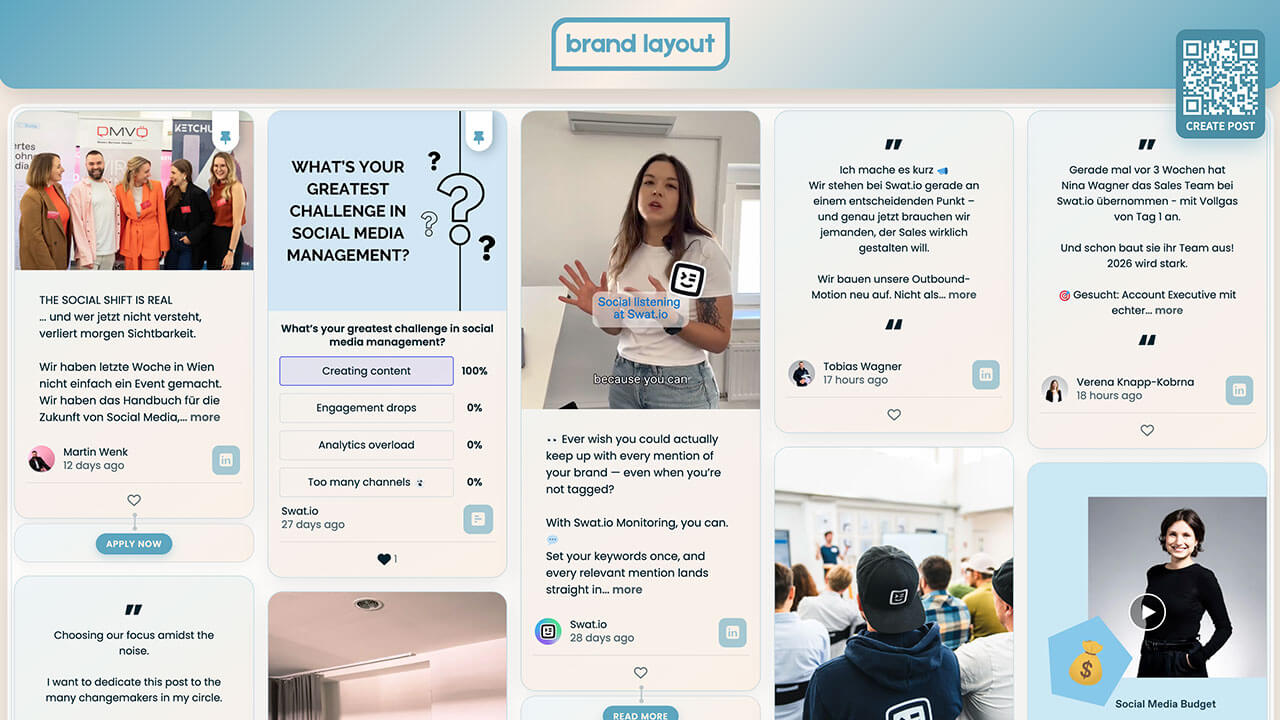
Layout Marken-Hub
Perfekt für Unternehmen, die mit ihrer Website und ihren Displays einen bleibenden Eindruck hinterlassen wollen.
Highlights der Anpassung:
- Markenspezifische Farbverläufe auf Kacheln
- Animierte Hover-Effekte bei Bildern und Videos
- Marken-Icons für soziale Medien
- Sanfter Schatten für einen Leuchteffekt bei Beiträgen
So geht's
Gehe zu Walls.io > Setup > Design.
Zur Wall gehenStelle sicher, dass du das „Fluid Layout“ und das Farbschema „Light“ ausgewählt hast.
Kopiere den folgenden CSS-Schnipsel in das Feld „Custom CSS“.
/******************************************************
  WALLS.IO — "Brand Hub" Theme
  • Header gradient and customised background
  • Custom Create Post button
  • Custom CTAs
  • Hover effect on posts
  • Custom Font
******************************************************/

/* FONT – modern retail style */
@import url('https://fonts.googleapis.com/css2?family=Poppins:wght@300;400;600;700&display=swap');

body {
  font-family: "Poppins", system-ui, -apple-system, BlinkMacSystemFont, "Segoe UI", sans-serif;
  color: #222222;
}

/* SUBTLE TEXTURED BACKGROUND USING BRAND COLORS */
html,
body {
  background-color: #faefe6;
  background-image:
    radial-gradient(circle at 1px 1px, rgba(255, 255, 255, 0.7) 1px, transparent 0),
    radial-gradient(circle at 3px 3px, rgba(93, 166, 191, 0.12) 1px, transparent 0);
  background-size: 16px 16px, 24px 24px;
}

/* Let our own background show */
.gradient-container {
  background: transparent !important;
}

/* WALL CONTAINER – soft inner glow frame */
.socialwall_container {
  margin-top: 130px !important;
  border-radius: 24px;
  background: rgba(255, 255, 255, 0.85);
  backdrop-filter: blur(14px);
  -webkit-backdrop-filter: blur(14px);
  box-shadow: 0 20px 60px rgba(0, 0, 0, 0.12);
  outline: 1px solid rgba(93, 166, 191, 0.25);
  outline-offset: -6px;
}

/* Comfortable spacing */
.theme-fluid .checkins {
  gap: 22px !important;
}

/* HEADER */
.socialwall_header {
  height: 110px !important;
  display: flex;
  align-items: center;
  justify-content: center;
  background: linear-gradient(
    135deg,
    #5da6bf 0%,
    #faefe6 50%,
    #5da6bf 100%
  );
  box-shadow: 0 10px 30px rgba(0, 0, 0, 0.15);
  border-radius: 0 0 24px 24px;
  padding: 12px 24px;
  z-index: 1000;
}

.socialwall_header_title {
  margin: 0 auto;
  display: flex;
  align-items: center;
  justify-content: center;
}

/* Logo */
.socialwall_header.custom img.logo,
.logo {
  height: 72px !important;
  max-height: 72px;
  width: auto;
}

/* Hide post instructions & header right column */
.post_instructions { display: none !important; }
.socialwall_header_infos { display: none; }

/* POST TEXT – general */
.theme-fluid .checkin-message {
  font-size: 14px;
  line-height: 1.5;
}
.theme-fluid .checkin-without-image .checkin-message {
  font-size: 14px;
}

/* PINNED POSTS – ensure text is 15px */
.checkin-pinned .checkin-message,
.checkin-pinned .checkin-message-inner,
.checkin-pinned.checkin-without-image .checkin-message {
  font-size: 15px !important;
}

/* POST CARDS */
.theme-fluid .checkin {
  border-radius: 20px;
  overflow: hidden;
  background: linear-gradient(
    145deg,
    rgba(93,166,191,0.10),
    rgba(250,239,230,0.95)
  );
  border: 1px solid rgba(93, 166, 191, 0.30);
  box-shadow: 0 10px 30px rgba(0, 0, 0, 0.08);
  position: relative;
  transition: box-shadow 0.3s ease, transform 0.2s.ease;
}

.theme-fluid .checkin:hover {
  box-shadow: 0 18px 45px rgba(0, 0, 0, 0.22);
  transform: translateY(-2px);
}

/* Media wrapper */
.theme-fluid .checkin-image-wrapper {
  border-radius: 16px 16px 0 0;
  overflow: hidden;
}

/* IMAGE / VIDEO */
.theme-fluid .checkin-image,
.theme-fluid .checkin-video,
.theme-fluid .checkin-image-tag {
  transition: transform 0.4s ease, filter 0.4s ease, box-shadow 0.4s ease;
  transform-origin: center center;
}

.theme-fluid .checkin:hover .checkin-image,
.theme-fluid .checkin:hover .checkin-video,
.theme-fluid .checkin:hover .checkin-image-tag {
  transform: scale(1.05);
  filter: saturate(1.15) contrast(1.05);
  box-shadow: 0 18px 40px rgba(0, 0, 0, 0.25);
}

/* CONTENT SPACING */
.theme-fluid .checkin-message-wrapper {
  padding: 14px 18px 12px 18px;
}
.theme-fluid .checkin-user {
  padding: 0 18px 10px 18px;
}

/* CTA BUTTON BLOCK — styled like post tiles */
.checkin-buttons {
  padding: 14px 18px 14px 18px;
  background: linear-gradient(
    145deg,
    rgba(93,166,191,0.10),
    rgba(250,239,230,0.95)
  );
  border-radius: 20px !important;
  border: 1px solid rgba(93, 166, 191, 0.30);
  box-shadow: 0 6px 18px rgba(0, 0, 0, 0.04);
  transition: box-shadow 0.3s ease, transform 0.2s ease;
}

/* HOVER EFFECT */
.checkin-buttons:hover {
  box-shadow: 0 18px 45px rgba(0, 0, 0, 0.22) !important;
  transform: translateY(-2px) !important;
}

/* Individual CTAs inside */
.checkin-buttons .checkin-cta {
  background: #5da6bf;
  color: #faefe6;
  border-radius: 999px;
  border: none;
  padding: 6px 14px;
  font-size: 12px;
  font-weight: 600;
  text-transform: uppercase;
  letter-spacing: 0.05em;
  box-shadow: 0 4px 10px rgba(93, 166, 191, 0.35);
  cursor: pointer;
  transition: background-color 0.2s ease, box-shadow 0.2s ease, transform 0.2s ease;
}

.checkin-buttons .checkin-cta:hover {
  background: #4b8da3;
  box-shadow: 0 6px 16px rgba(93, 166, 191, 0.45);
  transform: translateY(-1px);
}

/* NETWORK ICON BADGE */
.checkin-type {
  background: rgba(93, 166, 191, 0.55) !important;
  border-radius: 9px !important;
  font-size: 20px !important;
  color: #faefe6 !important;
  padding: 7px 10px !important;
  display: inline-flex;
  align-items: center;
  justify-content: center;
}

/* PIN ICON */
.checkin-pin-icon,
.checkin-pin-icon svg,
.checkin-pin-icon path {
  color: #5da6bf !important;
  fill: #5da6bf !important;
}

/* CREATE POST BUTTON */
#createPostButton {
  background-color: #4b8da3 !important;
  color: #ffffff !important;
  border-radius: 14px !important;
  box-shadow: 0 10px 28px rgba(93, 166, 191, 0.45);
  border: none;
  top: 40px !important;
  right: 24px !important;
  bottom: initial !important;
  left: initial !important;
}

#createPostButton span {
  font-weight: 600;
  color: #ffffff !important;
}

#createPostButton:hover {
  background-color: #5da6bf !important;
  box-shadow: 0 14px 36px rgba(93, 166, 191, 0.55);
}

/* LARGE SCREENS */
@media screen and (min-width: 1440px) {
  .socialwall_header { height: 120px !important; }
  .socialwall_container { margin-top: 140px !important; }
  .socialwall_header.custom img.logo, .logo { height: 80px !important; }
}

/* MOBILE (standard) */
@media screen and (max-width: 640px) {
  .socialwall_header { height: 90px !important; padding-inline: 12px; }
  .socialwall_header.custom img.logo, .logo { height: 54px !important; }
  .socialwall_container { margin-top: 105px !important; }
  .theme-fluid .checkin-message { font-size: 14px; }
  .checkin-buttons { padding-inline: 14px; }
}

/* 📱 MOBILE: MOVE CREATE POST BUTTON TO BOTTOM CENTER (≤ 576px) */
@media screen and (max-width: 576px) {
  #createPostButton {
    position: fixed !important;
    bottom: 24px !important;
    top: auto !important;
    left: auto !important;
    right: auto !important;
    z-index: 9999 !important;
  }
}
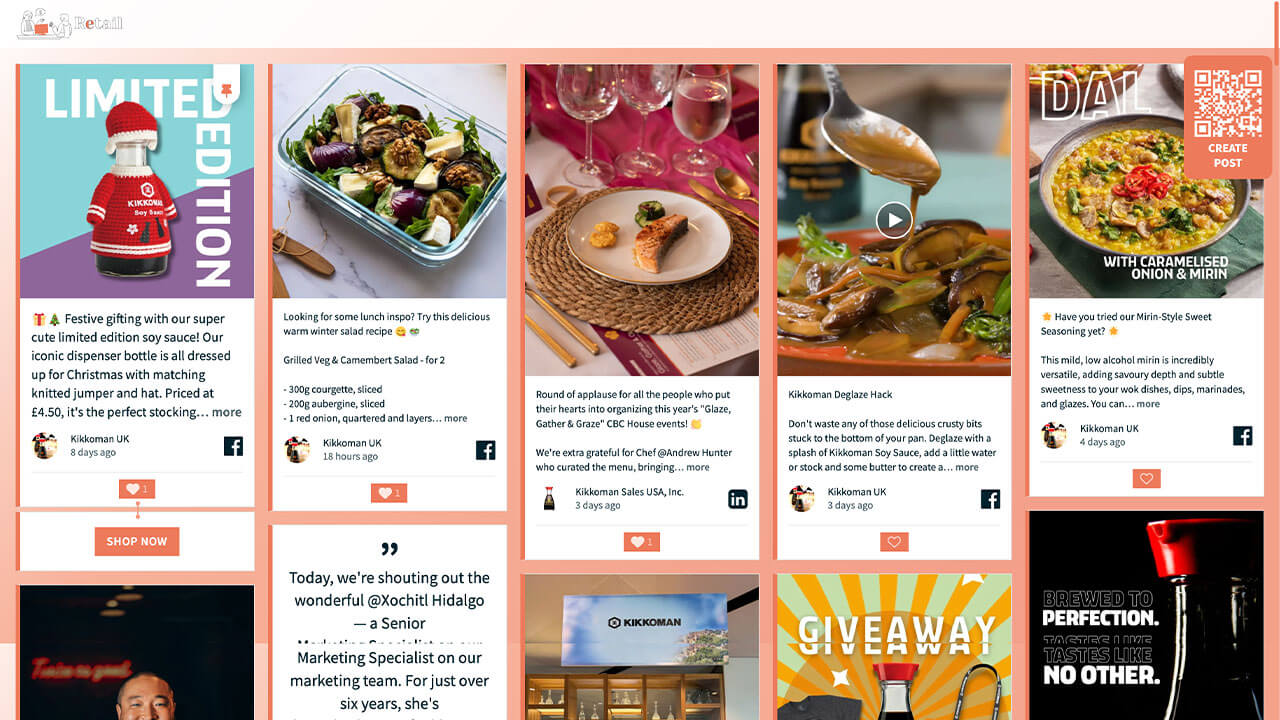
Layout Einzelhandel
Perfekt für Unternehmen aus dem Einzelhandel und E-Commerce.
Highlights der Anpassung:
- Markenspezifischer Hintergrundverlauf
- Individuelle Like-Buttons
- Individuelle CTA-Buttons im Markendesign
So geht's
Gehe zu Walls.io > Setup > Design.
Zur Wall gehenStelle sicher, dass du das Fluid-Layout und das Farbschema „Light“ ausgewählt hast.
Kopiere den folgenden CSS-Schnipsel in das Feld für benutzerdefiniertes CSS.
/******************************************************
  WALLS.IO — "Retail" Theme
  • Background gradient
  • Custom Create Post button
  • Custom Like Button
  • Custom CTAs
******************************************************/

html,
body {
  min-height: 100%;
}

html,
body,
#content,
#wallsio,
.wallsio-container,
.socialwall_wrapper,
#wallsio-app,
.wallsio-app,
.socialwall,
.theme-fluid {
  background-color: #F7B199; /* fallback */
  background-image: linear-gradient(
    135deg,
    #FFFFFF 0%,
    #F7B199 35%,
    #F3A08A 80%
  );
  background-repeat: no-repeat;
  background-size: cover;
}

/* --------------------------------------------------
   POSTS – LEFT BORDER ONLY, NO RADIUS
   + LIGHT GREY BORDER ON OTHER SIDES
-------------------------------------------------- */

.theme-fluid .checkin.checkin-color-1,
.theme-fluid .checkin-pinned.checkin-color-1 {
  border-radius: 0 !important;
  border-left: 6px solid #ED7A5B !important; /* brand border */
  border-top: 1px solid #e0e0e0 !important;
  border-right: 1px solid #e0e0e0 !important;
  border-bottom: 1px solid #e0e0e0 !important;
  padding-left: 0 !important;
  box-shadow: none !important;
}

.theme-fluid .checkin.checkin-color-1:hover,
.theme-fluid .checkin-pinned.checkin-color-1:hover {
  border-left-color: #ED7A5B !important;
}

/* --------------------------------------------------
   HEADER – PARTIALLY TRANSPARENT WHITE BACKGROUND
-------------------------------------------------- */

.socialwall_header {
  background: rgba(255, 255, 255, 0.9) !important;
  backdrop-filter: blur(6px);
  -webkit-backdrop-filter: blur(6px);
}

/* --------------------------------------------------
   CTA BUTTONS AREA (.checkin-buttons)
-------------------------------------------------- */

.theme-fluid .checkin-buttons {
  background: #ffffff !important;
  border-left: 6px solid #ED7A5B !important;
  border-top: 1px solid #e0e0e0 !important;
  border-right: 1px solid #e0e0e0 !important;
  border-bottom: 1px solid #e0e0e0 !important;
}

.theme-fluid .checkin-buttons .checkin-cta {
  background: #ED7A5B;
  color: #ffffff;
  border-radius: 0;
  border: none;
  text-transform: uppercase;
  letter-spacing: 0.04em;
  font-weight: 600;
  padding: 8px 16px;
  display: inline-block;
  transform: scale(1);
  transform-origin: center center;
  will-change: transform;
  transition:
    transform 0.2s ease-out,
    background-color 0.25s ease,
    color 0.25s ease;
}

.theme-fluid .checkin-buttons .checkin-cta:hover,
.theme-fluid .checkin-buttons .checkin-cta:focus {
  background: #f28e72;
  transform: scale(1.06) !important;
  color: #ffffff;
  box-shadow: none !important;
}

/* --------------------------------------------------
   DIRECT POSTS BUTTON (#createPostButton)
-------------------------------------------------- */

#createPostButton {
  background-color: #ED7A5B !important;
  color: #ffffff !important;
  border-radius: 12px !important;
  border: none !important;
  text-transform: uppercase;
  letter-spacing: 0.08em;
  font-weight: 700;
  padding: 5px !important;
  margin-right: 10px !important;
  transition:
    background-color 0.2s ease,
    transform 0.15s ease;
}

#createPostButton:hover {
  background-color: #f28e72 !important;
  transform: translateY(-2px);
}

#createPostButton:focus-visible {
  outline: 2px solid #ffffff;
  outline-offset: 3px;
}

/* --------------------------------------------------
   CONNECTOR — SOLID BRIGHTER BRAND COLOR
-------------------------------------------------- */

.connector,
.connector:before,
.connector:after {
  background: #F49A7F !important;
}

.connector,
.connector a,
.connector .connector__icon {
  color: #ffffff !important;
  fill: #ffffff !important;
}

/* --------------------------------------------------
   PIN ICON
-------------------------------------------------- */

.theme-fluid .checkin-pin-icon,
.theme-fluid .checkin-pin-icon svg {
  color: #ED7A5B !important;
  fill: #ED7A5B !important;
}

/* --------------------------------------------------
   LIKE BUTTON – PERFECTLY SQUARE, NO HOVER RADIUS
-------------------------------------------------- */

.theme-fluid .like-button {
  background-color: #ED7A5B !important;
  border-radius: 0 !important;
  border: none !important;
  color: #ffffff !important;
  padding: 4px 10px;
  display: inline-flex;
  align-items: center;
  justify-content: center;
  position: relative;
  overflow: hidden;
}

.theme-fluid .like-button::before,
.theme-fluid .like-button::after {
  content: none !important;
}

.theme-fluid .like-button *,
.theme-fluid .like-button *::before,
.theme-fluid .like-button *::after {
  border-radius: 0 !important;
}

.theme-fluid .like-button:hover {
  background-color: #f28e72 !important;
  border-radius: 0 !important;
  box-shadow: none !important;
}

.theme-fluid .like-button .icon {
  color: #ffffff !important;
}

.theme-fluid .like-button .icon.liked {
  color: #ffe7e0 !important;
}

.theme-fluid .like-button .icon.not-liked {
  color: #ffffff !important;
}

.theme-fluid .like-button .icon.loading {
  color: #ffffff !important;
}

/* --------------------------------------------------
   CUSTOM SCROLLBAR – CLEAN BRAND STYLE
-------------------------------------------------- */

/* Chrome, Edge, Safari */
::-webkit-scrollbar {
  width: 10px;
  height: 10px;
}

::-webkit-scrollbar-track {
  background: rgba(255, 255, 255, 0.4);
  border-radius: 10px;
}

::-webkit-scrollbar-thumb {
  background: #ED7A5B;
  border-radius: 10px;
  border: 2px solid rgba(255, 255, 255, 0.6);
}

::-webkit-scrollbar-thumb:hover {
  background: #d9684b;
}

/* Firefox */
* {
  scrollbar-width: thin;
  scrollbar-color: #ED7A5B rgba(255, 255, 255, 0.4);
}
Layout Bildung
Perfekt für Universitäten, die einzigartige Displays und Websites für den Semesterstart, Alumni-Events, Live-Abschlussfeiern und Newsrooms erstellen möchten.
Highlights der Anpassung:
- Animierter Hintergrund (dezent schwebende Punkte)
- Individuelle Like-Buttons
- Individuelle Pin-Buttons
- Animierter Hover-Effekt bei Bildern/Videos
- Weicher Schatten bei Beiträgen für einen Glow-Effekt

So geht's
Gehe zu Walls.io > Setup > Design.
Zur Wall gehenStelle sicher, dass du das Fluid-Layout und das Farbschema „Light“ ausgewählt hast.
Kopiere den folgenden CSS-Schnipsel in das Feld „Custom CSS“.
/************************************************************
  WALLS.IO — "Education" Theme
  • Blue animated background
  • Images and videos hover effect
  • High contrast
************************************************************/

body {
  background: linear-gradient(
    130deg,
    #0a1b2f,
    #0e3259,
    #124c85,
    #0a1b2f
  );
  background-size: 300% 300%;
  animation: bgShift 20s ease infinite;
}

@keyframes bgShift {
  0% { background-position: 0% 50%; }
  50% { background-position: 100% 50%; }
  100% { background-position: 0% 50%; }
}

/* Subtle floating particles */
body::before {
  content: "";
  position: fixed;
  top: 0; left: 0;
  width: 100%; height: 100%;
  pointer-events: none;
  background-image: radial-gradient(rgba(255,255,255,0.18) 2px, transparent 3px);
  background-size: 120px 120px;
  opacity: 0.45;
  animation: particlesFloat 14s linear infinite;
}

@keyframes particlesFloat {
  from { transform: translateY(0px); }
  to   { transform: translateY(-200px); }
}

/* -----------------------------------------------------
📦 2) Add spacing between posts
----------------------------------------------------- */
.theme-fluid .checkin-wrapper {
  padding: 20px 10px 0px !important; /* top 20, L/R 10, bottom 0 */
}

/* -----------------------------------------------------
📦 3) Posts – blue tiles with depth
----------------------------------------------------- */
.checkin {
  border-radius: 22px;
  overflow: hidden;
  transition: transform .35s ease, box-shadow .4s ease, background .4s ease;
  background: linear-gradient(
    to bottom right,
    rgba(40, 120, 220, 0.25),
    rgba(0, 80, 160, 0.25)
  );
  box-shadow: 0 0 20px rgba(0,0,0,0.35);
}

/* Hover scale 1.06 */
.checkin:hover {
  transform: scale(1.06);
  background: linear-gradient(
    to bottom right,
    rgba(40,120,220,0.45),
    rgba(0,80,160,0.45)
  );
  box-shadow: 0 0 35px rgba(40,120,220,0.55);
}

/* Glow halo */
.checkin::after {
  content: "";
  position: absolute;
  inset: 0;
  background: radial-gradient(circle, rgba(0,140,255,0.35), transparent 70%);
  opacity: 0;
  transition: opacity .4s ease;
  pointer-events: none;
}
.checkin:hover::after { opacity: 1; }

/* -----------------------------------------------------
💙 4) Media (no mask)
----------------------------------------------------- */
.theme-fluid .checkin-image,
.theme-fluid .checkin-image-tag,
.theme-fluid .checkin-video {
  -webkit-clip-path: none !important;
  clip-path: none !important;
}

/* Media enhancement */
.checkin-image,
.checkin-video {
  transition: filter .35s ease, transform .35s ease;
  filter: brightness(1.1) contrast(1.1);
}

.checkin-image {
  -webkit-filter: grayscale(35%);
  filter: grayscale(35%);
}

.checkin:hover .checkin-image,
.checkin:hover .checkin-video {
  transform: scale(1.06);
  -webkit-filter: grayscale(0%) brightness(1.25) contrast(1.2) saturate(1.2);
  filter: grayscale(0%) brightness(1.25) contrast(1.2) saturate(1.2);
}

/* Gentle floating for videos */
.checkin-video {
  animation: slowFloat 9s ease-in-out infinite alternate;
}

@keyframes slowFloat {
  from { transform: translateY(0px); }
  to   { transform: translateY(-6px); }
}

/* -----------------------------------------------------
📝 5) Text + links — high contrast
----------------------------------------------------- */
.checkin-message,
.checkin-user,
.checkin-timestamp {
  color: #ffffff !important;
  text-shadow: 0 2px 6px rgba(0,0,0,0.75);
}

.checkin-message a,
.checkin-user a {
  color: #7bc8ff !important;
  font-weight: 700;
  text-shadow: none !important;
}
.checkin-message a:hover,
.checkin-user a:hover {
  color: #b9e4ff !important;
  text-shadow: none !important;
}

/* -----------------------------------------------------
💡 6) Header styling
----------------------------------------------------- */

/* Use our dark glass header ONLY when there is NO header image */
.socialwall_header:not(.has-header-image) {
  background: rgba(0, 30, 60, 0.55) !important;
  backdrop-filter: blur(12px);
  box-shadow: 0 0 25px rgba(0,120,255,0.45);
}

/* When there IS a header image, let Walls.io handle the background. */
.socialwall_header.has-header-image {
  backdrop-filter: none;
  box-shadow: none;
}

/* Header text always styled for readability */
.socialwall_header_title,
.socialwall_header_infos,
.socialwall_header_infos a {
  color: #ffffff !important;
  text-shadow: 0 2px 6px rgba(0,0,0,0.75);
}

/* -----------------------------------------------------
✨ Hover transition end
----------------------------------------------------- */
.checkin {
  transition: transform .35s ease;
}

/* -----------------------------------------------------
💙 7) LIKE BUTTON — LIGHT BLUE, HEART + COUNTER MATCH
----------------------------------------------------- */

.like-button {
  background: rgba(130, 200, 255, 0.35) !important;
  border-radius: 14px;
  padding: 6px 12px;
  border: 1px solid rgba(180, 230, 255, 0.65) !important;
  color: #b9e4ff !important;
}

.like-button .icon,
.icon.not-liked,
.icon.liked {
  color: #b9e4ff !important;
}

.icon.liked {
  filter: drop-shadow(0 0 3px rgba(180, 230, 255, 0.7));
}

/* ---------------------------------------------------
   DIRECT POST BUTTON
--------------------------------------------------- */
#createPostButton {
  background-color: #3c5b97;
  color: white;
}
#createPostButton:hover{
  background-color: #204271;
}
/* ---------------------------------------------------
   PIN COLOUR
--------------------------------------------------- */

.checkin-pin-icon {
  color: #3c5b97 !important;
}
Layout Herbst
Perfekt für alle, die ihre Social Walls passend zu den Farben und Events der Jahreszeit gestalten wollen.
Highlights der Anpassung:
- Header-Verlauf
- Abgerundete Profilbilder
- Strukturierter Hintergrund

So geht's
Gehe zu Walls.io > Setup > Design.
Zur Wall gehenStelle sicher, dass du das Kiosk-Layout und das Farbschema „Dynamic“ ausgewählt hast.
Kopiere den folgenden CSS-Schnipsel in das Feld für benutzerdefiniertes CSS.
/************************************************************
  WALLS.IO — "🍂 Fall" Theme
  • Centered logo in header
  • Big user images
  • Post text with gradient background
************************************************************/

/* Fall gradient header */
.socialwall_header {
  background: linear-gradient(
    90deg,
    rgba(246, 179, 107, 0.35),
    rgba(255, 138, 74, 0.35),
    rgba(142, 59, 102, 0.35)
  );
  border-bottom: 1px solid rgba(255, 220, 190, 0.2);
  box-shadow: 0 8px 24px rgba(0,0,0,0.45);
  display: flex;
  align-items: center;
  justify-content: center;
}

/* Center the logo wrapper */
.socialwall_header_title {
  margin: 0 auto;
}

/* Hide post instructions */
.socialwall_header_infos {
  display: none !important;
}

/* Hide built-in app logo variants */
.socialwall_logo,
.app-logo.app-logo,
.app-logo.app-logo img {
  display: none !important;
}

/* Make sure wrappers don’t constrain alignment */
.socialwall_header_title,
.socialwall_header_title a {
  display: flex !important;
  align-items: center !important;
  justify-content: center !important;
}

/* Push posts down to prevent overlap with 100px header */
.socialwall_container {
  margin-top: 115px !important;
}


/* ====================================================
   🍂 USER IMAGE — 100px, square rounded
==================================================== */

.checkin-user-image img,
.checkin-user-image {
  width: 100px;
  height: 100px;
  border-radius: 14px;
  object-fit: cover;
  border: 3px solid rgba(246,179,107,0.75);
  margin: 0 auto;
  display: block;
}


/* ====================================================
   🍂 USER INFO — Block layout, centered group, left text
==================================================== */

.theme-kiosk .checkin-user {
  display: block;
  font-size: 14px;
  text-align: center;
  line-height: 1.2;
  margin-top: 8px;
}

.theme-kiosk .checkin-user-name,
.theme-kiosk .checkin-user-name a,
.theme-kiosk .checkin-timestamp {
  font-size: 14px !important;
  display: block;
  margin-top: 4px;
  text-align: left !important;
  margin-left: auto;
  margin-right: auto;
  width: fit-content;
}


/* ====================================================
   🍂 TEXT AREA — Centered, rounded gradient, 0.77em text
==================================================== */

.theme-kiosk .checkin-message-wrapper {
  background: linear-gradient(
    135deg,
    rgba(246, 179, 107, 0.9) 0%,
    rgba(255, 138, 74, 0.93) 35%,
    rgba(228, 84, 77, 0.93) 70%,
    rgba(142, 59, 102, 0.95) 100%
  );

  padding: 20px 24px;
  margin: 14px;
  border-radius: 20px;
  text-align: center;
}

.theme-kiosk .checkin-message,
.theme-kiosk .checkin-message-inner {
  color: #1b0c08;
  font-size: 0.77em !important;
  line-height: 1.5;
  text-align: center;
}

.theme-kiosk .checkin-message a {
  color: #4b280f;
  font-weight: 600;
  border-bottom: 1px solid rgba(75, 40, 15, 0.4);
  text-decoration: none;
}

.theme-kiosk .checkin-message a:hover {
  border-bottom-color: rgba(75, 40, 15, 0.8);
}

/* ---------------------------------------------------
   DIRECT POST BUTTON
--------------------------------------------------- */
#createPostButton {
  background-color: #4b280f;
  color: white;
}
#createPostButton:hover{
  background-color: #1b0c08;
}
/* ---------------------------------------------------
   PIN COLOUR
--------------------------------------------------- */

.checkin-pin-icon {
  color: #4b280f !important;
}
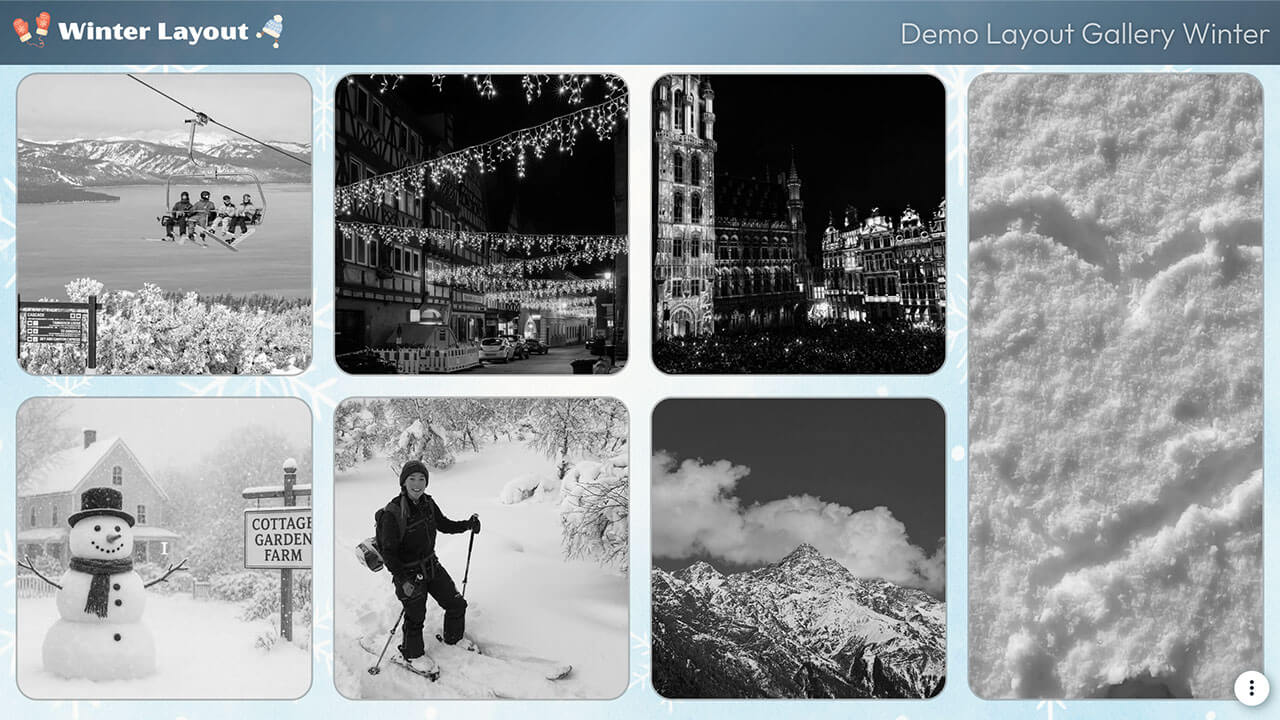
Layout Winter
Perfekt für alle, die ihre Social Walls passend zu den Farben und Events der Saison gestalten wollen.
Highlights der Anpassung:
- Graustufen-Bilder, die beim Drüberfahren farbig werden
- Animierter Pulse-Effekt an den Kachelrändern
- Individuelle Linkfarben
- Marken-Gradient im Header
So geht's
Gehe zu Walls.io > Setup > Design.
Zur Wall gehenStelle sicher, dass du das Bricks-Layout und das Farbschema „Custom“ ausgewählt hast.
Lade das Hintergrundbild herunter und füge es im Feld „Background image“ hinzu.
Kopiere den folgenden CSS-Schnipsel in das Feld für benutzerdefiniertes CSS.
/******************************************************
  WALLS.IO — "Winter" Theme
  • Background image
  • Grayscale images going full colour when hover
  • Gradient header
  • Custom Font
******************************************************/

/* --------------------------------------------------
   IMPORT FONT — OUTFIT
-------------------------------------------------- */
@import url('https://fonts.googleapis.com/css2?family=Outfit:wght@300;400;500;600;700&display=swap');

/* --------------------------------------------------
   BASE TYPOGRAPHY
-------------------------------------------------- */
body {
  font-family: "Outfit", sans-serif !important;
  color: #e8f7ff;
  /* background image handled in Walls.io settings */
}

/* --------------------------------------------------
   HEADER – EXACTLY 9vh + WINTER GRADIENT
-------------------------------------------------- */
.socialwall_header {
  height: 9vh !important;
  min-height: 9vh !important;
  max-height: 9vh !important;

  /* soft frosty blue-to-navy gradient */
  background: linear-gradient(
    135deg,
    rgba(10, 31, 51, 0.70) 0%,        /* deep frosty navy */
    rgba(32, 96, 140, 0.55) 50%,      /* icy blue */
    rgba(10, 31, 51, 0.70) 100%       /* back to deep navy */
  ) !important;

  backdrop-filter: blur(4px);
}

/* header text */
.socialwall_header_title,
.post_instructions {
  color: #e8f7ff !important;
  font-weight: 500 !important;
  text-shadow: 0 0 6px rgba(0,0,0,0.3);
}

/* header links */
.socialwall_header a {
  color: #7cd2ff !important;
  text-decoration: none;
}

.socialwall_header a:hover {
  color: #b2ecff !important;
}

/* --------------------------------------------------
   CONTAINER – LEAVE LAYOUT ALONE (VERY IMPORTANT)
-------------------------------------------------- */
.socialwall_container {
  /* intentionally empty */
}

/* --------------------------------------------------
   TEXT & LINK COLORS IN POSTS
-------------------------------------------------- */
.checkin-message,
.checkin-user,
.checkin-timestamp {
  color: #e8f7ff !important;
}

.checkin-message a,
.checkin-user a,
.checkin-timestamp a {
  color: #7cd2ff !important;
  text-decoration: none !important;
}

.checkin-message a:hover,
.checkin-user a:hover {
  color: #b2ecff !important;
}

/* --------------------------------------------------
   POSTS — BORDER + ROUNDED CORNERS
-------------------------------------------------- */
.theme-bricks .checkin {
  border-radius: 22px !important;
  border: 2px solid rgba(255,255,255,0.25) !important;
  background: rgba(0,0,0,0.35) !important;
  overflow: hidden;
  position: relative;
}

/* --------------------------------------------------
   BORDER PULSE ANIMATION ON HOVER
-------------------------------------------------- */
.theme-bricks .checkin::after {
  content: "";
  position: absolute;
  inset: 0;
  border-radius: inherit;
  pointer-events: none;

  border: 2px solid rgba(124,210,255,0);
  box-shadow: 0 0 0 rgba(124,210,255,0);
  opacity: 0;

  transition: opacity 0.25s ease;
}

.theme-bricks .checkin:hover::after {
  opacity: 1;
  animation: borderPulse 1.4s ease-in-out infinite;
}

@keyframes borderPulse {
  0% {
    border-color: rgba(124,210,255,0.2);
    box-shadow: 0 0 6px rgba(124,210,255,0.3),
                0 0 10px rgba(178,236,255,0.2);
  }
  50% {
    border-color: rgba(124,210,255,0.9);
    box-shadow: 0 0 16px rgba(124,210,255,0.8),
                0 0 26px rgba(178,236,255,0.6);
  }
  100% {
    border-color: rgba(124,210,255,0.2);
    box-shadow: 0 0 6px rgba(124,210,255,0.3),
                0 0 10px rgba(178,236,255,0.2);
  }
}

/* --------------------------------------------------
   BLACK & WHITE → COLOR ON HOVER FOR MEDIA
-------------------------------------------------- */
.theme-bricks .checkin-image,
.theme-bricks .checkin-video,
.theme-bricks .checkin-image-tag {
  filter: grayscale(100%) !important;
  -webkit-filter: grayscale(100%) !important;
  transition: filter 0.4s ease, -webkit-filter 0.4s ease;
}

.theme-bricks .checkin:hover .checkin-image,
.theme-bricks .checkin:hover .checkin-video,
.theme-bricks .checkin:hover .checkin-image-tag {
  filter: grayscale(0%) !important;
  -webkit-filter: grayscale(0%) !important;
}

/* ---------------------------------------------------
   DIRECT POST BUTTON
--------------------------------------------------- */
#createPostButton {
  background-color: #647b8d;
  color: white;
}
#createPostButton:hover{
  background-color: #91d0fb;
}
/* ---------------------------------------------------
   PIN COLOUR
--------------------------------------------------- */

.checkin-pin-icon {
  color: #91d0fb !important;
}
Layout Feier
Perfekt für Unternehmen, die Erfolge, Erinnerungen und Jubiläen feiern möchten. Ideal für Employer Branding und interne HR-Initiativen.
Highlights der Anpassung:
- Animierter Applaus-Button als Reaktion
- Halbtransparente Kopfzeile
- Sich ändernde Kachelrahmenfarbe beim Drüberfahren
- Weicher Schatten auf Beiträgen für einen Leuchteffekt

So geht's
Gehe zu Walls.io > Setup > Design.
Zur Wall gehenStelle sicher, dass du das Fluid-Layout und das Farbschema „Light“ ausgewählt hast.
Kopiere den folgenden CSS-Schnipsel in das Feld für benutzerdefiniertes CSS.
/************************************************************
  WALLS.IO — "🎉 Celebration" Theme
  • Google Font
  • Warm orange palette
  • Clapping hands like button
************************************************************/

/* Google font */
@import url('https://fonts.googleapis.com/css2?family=Poppins:wght@400;600&display=swap');

:root {
  --ink: #1e1f23;
  --muted: #667085;
  --accent: #ff9757;        /* warm orange */
  --accent-light: #ffb985;
  --tile: rgba(255, 255, 255, 0.92);
  --shadow: rgba(0, 0, 0, 0.08);

  --clap-outline: url("https://cdn.prod.website-files.com/5f1175d8eef44a6c5d6661fb/691af77460b4ad87095065c5_hands-clapping-outline.svg");
  --clap-solid:   url("https://cdn.prod.website-files.com/5f1175d8eef44a6c5d6661fb/691af77479d3dfd424553649_hands-clapping-solid.svg");
}

/* ---------------------------------------------------
   BACKGROUND
--------------------------------------------------- */
body {
  font-family: "Poppins", system-ui, -apple-system, Segoe UI, Roboto, Helvetica, Arial, sans-serif;
  color: var(--ink);
  background: linear-gradient(
    135deg,
    #fff7f9 0%,
    #fff1e3 35%,
    #f9fbff 70%,
    #fff9f2 100%
  );
  background-attachment: fixed;
}

body::after,
body::before { content: none !important; }

/* ---------------------------------------------------
   HEADER
--------------------------------------------------- */
.socialwall_header {
  background: rgba(255,255,255,0.85);
  backdrop-filter: blur(10px);
  border-radius: 0 0 18px 18px;
  box-shadow: 0 6px 18px var(--shadow);
  padding: 10px 0;
}

.socialwall_header_title,
.socialwall_header_infos { color: var(--ink) !important; }

.socialwall_header a {
  color: var(--accent) !important;
  text-decoration: none;
}
.socialwall_header a:hover {
  color: var(--accent-light) !important;
}

/* ---------------------------------------------------
   POSTS
--------------------------------------------------- */
.theme-fluid .checkin {
  background: var(--tile);
  border-radius: 20px;
  border: 2px solid transparent;
  box-shadow: 0 4px 12px var(--shadow);
  transition: transform .25s ease, box-shadow .25s ease, border-color .25s ease;
}

/* One-time border pulse */
.theme-fluid .checkin:hover {
  transform: translateY(-3px);
  box-shadow: 0 8px 22px rgba(0,0,0,0.16);
  animation: borderPulse 1.3s ease-in-out 1;
}

@keyframes borderPulse {
  0% { border-color: rgba(255,151,87,0.2); }
  50% {
    border-color: rgba(255,151,87,0.7);
    box-shadow:
      0 0 0 1px rgba(255,151,87,0.35),
      0 12px 28px rgba(0,0,0,0.18);
  }
  100% { border-color: rgba(255,151,87,0.2); }
}

.theme-fluid .checkin-image-wrapper {
  border-radius: 20px 20px 0 0;
  overflow: hidden;
}
.theme-fluid .checkin-image {
  border-radius: 20px 20px 0 0;
  object-fit: cover;
}

.theme-fluid .checkin-message {
  font-size: 15px;
  line-height: 1.5;
  color: var(--ink);
  padding: 12px 16px 0 16px;
}

.theme-fluid .checkin-user {
  color: var(--muted);
  font-weight: 500;
  padding: 6px 16px 12px 16px;
  font-size: 13px;
  margin-top: 15px;
}

/* ---------------------------------------------------
   REACTIONS AREA
--------------------------------------------------- */
.user-reactions-wrapper {
  display: inline-flex;
  align-items: center;
  gap: 8px;
  margin: 8px 14px 14px;
}

/* ---------------------------------------------------
   ⭐ UPDATED LIKE BUTTON
--------------------------------------------------- */
.like-button {
  display: inline-flex;
  align-items: center;
  gap: 6px;

  padding: 8px 10px;
  border-radius: 999px;

  background: rgba(0,0,0,0.05);
  border: 2px solid var(--accent);

  color: var(--accent);
  font-weight: 700;

  backdrop-filter: none;
  box-shadow: none !important;

  transition: transform 0.16s ease, background 0.2s ease, border-color 0.2s ease;
}

.like-button:hover {
  transform: translateY(-1px);
  background: rgba(0,0,0,0.08);
}

/* ---------------------------------------------------
   👏 CLAPPING HANDS (recolorable)
--------------------------------------------------- */
.like-button .icon:not(.loading) * {
  opacity: 0 !important;
}

.like-button .icon {
  width: 18px;
  height: 18px;
  position: relative;
}

/* Outline */
.like-button .icon.not-liked::before {
  content: "";
  position: absolute; inset: 0;

  mask-image: var(--clap-outline);
  -webkit-mask-image: var(--clap-outline);
  mask-size: contain; -webkit-mask-size: contain;
  mask-repeat: no-repeat; mask-position: center;
  -webkit-mask-repeat: no-repeat; -webkit-mask-position: center;

  background-color: var(--accent);
  opacity: .9;
}

/* Solid */
.like-button .icon.liked::before {
  content: "";
  position: absolute; inset: 0;

  mask-image: var(--clap-solid);
  -webkit-mask-image: var(--clap-solid);
  mask-size: contain; -webkit-mask-size: contain;
  mask-repeat: no-repeat; mask-position: center;

  background-color: var(--accent);
}

/* Glow + heartbeat */
.like-button .icon.liked {
  animation: heartBeat 2s ease-in-out infinite;
  filter: drop-shadow(0 0 8px color-mix(in srgb, var(--accent), white 35%));
}

@keyframes heartBeat {
  0%,100% { transform: scale(1); }
  15% { transform: scale(1.2); }
  30% { transform: scale(1.05); }
  45% { transform: scale(1.15); }
  60% { transform: scale(1.0); }
}

.like-button .count {
  color: var(--accent);          /* match button text color */
  font-weight: 700;              /* bold */
  letter-spacing: 0.2px;
}

/* Spinner */
.like-button .icon.loading {
  opacity: 1;
  background-image:
    radial-gradient(circle at 50% 50%, var(--accent) 30%, transparent 31%),
    conic-gradient(from 0deg, #fff 0 50%, transparent 50% 100%);
  background-size: 18px 18px;
  background-position: center;
}

.like-button .icon.loading use { opacity: 0; }

/* ---------------------------------------------------
   CLEANUP
--------------------------------------------------- */
.no-more-posts { display: none !important; }

/* ---------------------------------------------------
   DIRECT POST BUTTON
--------------------------------------------------- */
#createPostButton {
  background-color: #ff9757;
  color: white;
}
#createPostButton:hover{
  background-color: #ffb985;
}
/* ---------------------------------------------------
   PIN COLOUR
--------------------------------------------------- */

.checkin-pin-icon {
  color: #ff9757 !important;
}
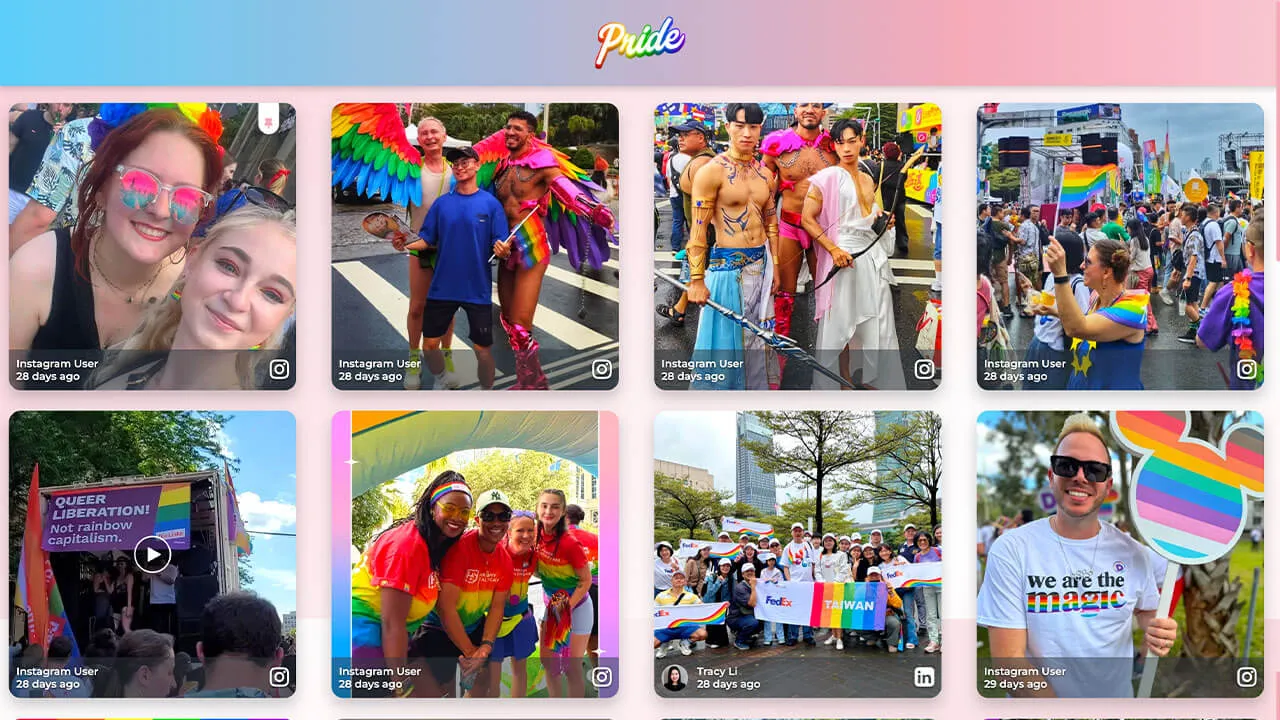
Layout Pride
Perfekt für Events rund um Diversität oder soziale Themen, bei denen Unternehmen Flagge zeigen wollen.
Highlights der Anpassung:
- Animierter Farbverlauf-Header
- Animierter Hintergrund (wechselnde Farben)
- Wackel-Effekt bei den Kacheln
- Weicher Schatten bei Beiträgen für einen Leuchteffekt
So geht's
Gehe zu Walls.io > Setup > Design.
Zur Wall gehenStelle sicher, dass du das Grid-Layout und das Farbschema „Classic“ ausgewählt hast.
Kopiere den folgenden CSS-Schnipsel in das Feld für benutzerdefiniertes CSS.
/************************************************************
  WALLS.IO — "💙🤍💗 Pride" Theme
  • Animated gradient header & background
  • Image/video hover glow
  • Square tile sizing
  • Custom "No more posts" message
************************************************************/

@import url('https://fonts.googleapis.com/css2?family=Montserrat:wght@400;600&display=swap');

/* --- Palette tokens --- */
:root {
  --t-blue:  #5BCEFA;
  --t-pink:  #F5A9B8;
  --t-white: #FFFFFF;

  --header-text: #fff;
  --logo-max-height: 88px;
  --header-padding-y: 14px;
  --tile-radius: 16px;
}

/* --- Animated TRANS background (under header too) --- */
body {
  font-family: "Montserrat", system-ui, -apple-system, Segoe UI, Roboto, sans-serif;
  position: relative;
}
body::before {
  content: "";
  position: fixed; inset: 0; z-index:-1;
  background: linear-gradient(135deg,
    var(--t-blue), var(--t-pink), var(--t-white), var(--t-pink), var(--t-blue)
  );
  background-size: 400% 400%;
  animation: transBg 22s ease-in-out infinite;
}
@keyframes transBg{
  0%{background-position:0% 50%}
  50%{background-position:100% 50%}
  100%{background-position:0% 50%}
}

/* --- Header: animated trans gradient + centered logo --- */
:root {
  --header-gradient: linear-gradient(90deg,
    var(--t-blue), var(--t-pink), var(--t-white), var(--t-pink), var(--t-blue)
  );
}
.socialwall_header{
  background: var(--header-gradient);
  background-size: 300% 300%;
  animation: headerShimmer 10s linear infinite;
  color: var(--header-text);
  border:none;
  box-shadow:0 3px 10px rgba(0,0,0,.2);
  padding-top:var(--header-padding-y) !important;
  padding-bottom:var(--header-padding-y) !important;
  min-height:calc(var(--logo-max-height) + (var(--header-padding-y) * 2));
}
@keyframes headerShimmer {
  0%{background-position:0% 50%}
  50%{background-position:100% 50%}
  100%{background-position:0% 50%}
}

/* Center logo */
.socialwall_header_title{
  margin:0 auto !important;
  text-align:center !important;
  width:100% !important;
}
.socialwall_header_infos{ display:none !important; }
.logo,
.socialwall_header .logo,
.socialwall_header img.logo{
  display:block;
  margin:0 auto !important;
  max-height:var(--logo-max-height) !important;
  height:auto !important;
  width:auto !important;
  max-width:min(80vw,760px);
  object-fit:contain;
}
@media(max-width:480px){
  .logo{ width:160px; max-height:64px !important; }
}

/* --- Keep posts safely below the header --- */
.socialwall_container{
  padding-top:48px !important;
}

/* --- Tile styling --- */
.theme-grid .checkin{
  border-radius:var(--tile-radius);
  overflow:hidden;
  background:rgba(255,255,255,0.10);
  backdrop-filter:blur(4px);
  box-shadow:0 10px 20px rgba(0,0,0,0.22);
  transition:transform .3s ease, box-shadow .3s ease;
  will-change:transform;
}

/* --- Independent gentle motion per tile --- */
.theme-grid .checkin{
  --fx:0px; --fy:6px; --frot:0deg; --fdur:7s; --fdel:0s;
  animation:wobble var(--fdur) ease-in-out var(--fdel) infinite;
}
@keyframes wobble{
  0%{transform:translate(0,0) rotate(0deg);}
  25%{transform:translate(calc(var(--fx)*.6), calc(var(--fy)*.4)) rotate(calc(var(--frot)*.4));}
  50%{transform:translate(var(--fx), var(--fy)) rotate(var(--frot));}
  75%{transform:translate(calc(var(--fx)*.3), calc(var(--fy)*-.3)) rotate(calc(var(--frot)*-.3));}
  100%{transform:translate(0,0) rotate(0deg);}
}

/* Hover lift */
.theme-grid .checkin:hover,
.theme-grid .checkin:focus-visible{
  animation-play-state:paused;
  transform:scale(1.05);
  box-shadow:0 0 25px rgba(255,255,255,0.6);
}

/* --- Media hover glow --- */
.theme-grid .checkin-image-wrapper,
.theme-grid .checkin-video{
  flex:1 1 auto;
  min-height:0;
}
.theme-grid .checkin-image-wrapper img,
.theme-grid .checkin-video video{
  width:100%; height:100%;
  object-fit:cover;
  border-radius:calc(var(--tile-radius) - 4px);
  transition:transform .4s ease, filter .4s ease;
  filter:brightness(1.05) saturate(1.3);
}
.theme-grid .checkin:hover .checkin-image-wrapper img,
.theme-grid .checkin:hover .checkin-video video{
  transform:scale(1.04);
  filter:brightness(1.2) saturate(1.6)
    drop-shadow(0 0 12px rgba(255,255,255,0.8));
}

/* --- Text overlay only on hover --- */
.theme-grid .checkin-message-wrapper{
  opacity:0;
  visibility:visible !important;
  transition:opacity .25s ease;
}
.theme-grid .checkin:hover .checkin-message-wrapper{
  opacity:1;
}

/* --- Emoji fix --- */
.theme-grid .checkin-message img,
.detail-message img{
  max-width:1em;
  max-height:1em;
  vertical-align:-0.15em;
}

/* --- Text styles --- */
.theme-grid .checkin-message,
.checkin-user,
.checkin-timestamp{
  color:#fff !important;
  text-shadow:0 1px 3px rgba(0,0,0,.6);
}

/* --- NEW: Solid Colour “No more posts” --- */
.no-more-posts-inner {
  background: var(--t-blue) !important;
  color: #fff !important;
  font-weight: 700;
  padding: 14px 26px !important;
  border-radius: 14px;
  text-transform: uppercase;
  letter-spacing: 0.6px;
  box-shadow: 0 0 14px rgba(91,206,250,0.45);
  backdrop-filter: blur(6px);
  display: inline-block;
}

/* --- Accessibility --- */
.checkin:focus-visible{
  outline:3px solid #fff; outline-offset:2px;
}

/* ==============================
   OFFICIAL SQUARE-TILES SNIPPET
   ============================== */
.theme-grid .checkin-wrapper{
  height:98vw !important;
  width:98vw !important;
  padding:2vw;
  margin-left:auto;
  margin-right:auto;
}
@media(min-width:580px){
  .theme-grid .checkin-wrapper{
    height:49vw !important;
    width:49vw !important;
    padding:1vw;
  }
}
@media(min-width:960px){
  .theme-grid .checkin-wrapper{
    height:32vw !important;
    width:32vw !important;
    padding:0.8vw;
  }
}
@media(min-width:1280px){
  .theme-grid .checkin-wrapper{
    height:24vw !important;
    width:24vw !important;
    padding:0.8vw;
  }
}

/* ======================================
   CUSTOM SCROLLBAR
   ====================================== */
::-webkit-scrollbar{
  width:12px; height:12px;
}
::-webkit-scrollbar-track{
  background:rgba(91,206,250,0.25);
  border-radius:10px;
}
::-webkit-scrollbar-thumb{
  background:var(--t-pink);
  border-radius:10px;
  border:2px solid rgba(255,255,255,0.6);
}
::-webkit-scrollbar-thumb:hover{
  background:var(--t-white);
  border-color:var(--t-pink);
  box-shadow:0 0 6px rgba(245,169,184,0.8);
}

/* Firefox */
*{
  scrollbar-width:thin;
  scrollbar-color:var(--t-pink) rgba(91,206,250,0.25);
}
/* ======================================
   PINNED POST ICON — no shadow
   ====================================== */
.checkin-pin-icon {
  color: var(--t-pink) !important;
  text-shadow: none !important;
}
.checkin-pin-icon svg,
.checkin-pin-icon path {
  fill: var(--t-pink) !important;
}

/* ======================================
   CREATE POST BUTTON — blue, left-rounded, no glow
   ====================================== */
#createPostButton {
  background-color: var(--t-blue) !important;
  color: #fff !important;
  border: none !important;
  border-radius: 14px 0 0 14px !important; /* left curve only */
  box-shadow: none !important;
  font-weight: 700;
}

/* hover / focus */
#createPostButton:hover,
#createPostButton:focus-visible {
  background-color: var(--t-pink) !important;
  box-shadow: none !important;
}
Layout Sport
Perfekt für Sportvereine, die auf riesigen Bildschirmen und Websites für echte Hingucker sorgen wollen.
Highlights der Anpassung:
- Marken-Farbverläufe auf Kacheln
- Animierte Hover-Effekte bei Bildern und Videos
- Halbtransparente Kopfzeile

So geht's
Gehe zu Walls.io > Setup > Design.
Zur Wall gehenStelle sicher, dass du das „Fluid Layout“ und das Farbschema „Light“ ausgewählt hast.
Kopiere den folgenden CSS-Schnipsel in das Feld „Custom CSS“.
/************************************************************
  WALLS.IO — "Live Sports" Theme
  • Stadium background
  • Bright accent color for header links & hashtags
  • Customised Like Button
************************************************************/

/* 1) Theme tokens */
:root {
  --club-primary: #0b5;          /* pitch green */
  --club-secondary: #0a2a4a;     /* deep navy */
  --club-accent: #ffd100;        /* match-day yellow */
  --ink: #ffffff;                /* pure white text */
  --ink-muted: #b9d4cc;
  --card-bg: #0f1c2a;
  --shadow: 0 10px 30px rgba(0,0,0,.35);
  --radius-xl: 22px;
}

/* 2) Stadium backdrop */
html, body {
  background:
    radial-gradient(1200px 500px at 50% -10%, rgba(255,255,255,.10), transparent 60%),
    radial-gradient(900px 400px at 50% 110%, rgba(255,255,255,.08), transparent 55%),
    /* floodlights grid */
    repeating-radial-gradient(circle at 10% 5%, rgba(255,255,255,.06) 0 2px, transparent 2px 12px),
    /* pitch stripes */
    repeating-linear-gradient(to bottom, rgba(255,255,255,.03) 0 60px, rgba(0,0,0,.06) 60px 120px),
    linear-gradient(180deg, var(--club-secondary), #061521 60%, #04101a);
  color: var(--ink);
}

/************************************************************
  3) Header — translucent + accent scarf + visible links
************************************************************/
.socialwall_header {
  position: sticky;
  top: 0;
  z-index: 999;
  height: 80px;
  display: flex;
  align-items: center;
  gap: 16px;
  padding: 10px 18px !important;
  color: var(--ink);
  background: linear-gradient(180deg, rgba(10,42,74,.92), rgba(10,42,74,.72));
  backdrop-filter: blur(6px);
  border-bottom: 1px solid rgba(255,255,255,.12);
}

.socialwall_header::after {
  content: "";
  position: absolute;
  left: 0; right: 0; bottom: 0;
  height: 3px;
  background: linear-gradient(90deg, var(--club-accent), rgba(255,255,255,0) 35%, var(--club-primary));
  opacity: .9;
}

/* Header logo */
.socialwall_header img.logo,
.socialwall_header .logo img {
  height: 52px;
  width: auto;
}

/* Header titles/text */
.socialwall_header h1,
.socialwall_header .title,
.socialwall_header .headline {
  margin: 0;
  font-size: 1.25rem;
  font-weight: 800;
  letter-spacing: .02em;
}
.socialwall_header .post_instructions,
.socialwall_header p {
  color: var(--ink-muted);
  margin: 0;
}

/* Header links visible */
.socialwall_header a,
.socialwall_header a:visited {
  color: var(--club-accent) !important;
  font-weight: 800;
  text-decoration: none;
  opacity: 1 !important;
}
.socialwall_header a:hover,
.socialwall_header a:focus,
.socialwall_header a:focus-visible {
  color: #ffffff !important;
  text-decoration: underline;
}
.socialwall_header .post_instructions a,
.socialwall_header p a {
  opacity: 1 !important;
}

@media (max-width: 980px) {
  .socialwall_header {
    height: 68px;
    padding: 8px 14px !important;
  }
  .socialwall_header img.logo,
  .socialwall_header .logo img {
    height: 42px;
  }
}

/************************************************************
  Fix: reduce gap between header and first row of posts
************************************************************/
.socialwall_container,
.socialwall_posts_container {
  margin-top: 0 !important;
  padding-top: 0.4em !important;
}

/************************************************************
  4) Post cards
************************************************************/
.checkin {
  border-radius: var(--radius-xl);
  margin: 0.6em;
  background:
    linear-gradient(180deg, rgba(255,255,255,.05), rgba(255,255,255,.02)) padding-box,
    linear-gradient(135deg, var(--club-primary), rgba(255,255,255,0) 40%) border-box,
    var(--card-bg);
  border: 1px solid transparent;
  box-shadow: var(--shadow);
  overflow: hidden;
  transition: transform .18s ease, box-shadow .18s ease, border-color .18s ease;
}
.checkin:hover {
  transform: translateY(-3px);
  box-shadow: 0 16px 40px rgba(0,0,0,.5);
  border-color: rgba(255,255,255,.16);
}

/* Media inside posts */
.checkin img,
.checkin video,
.checkin iframe {
  border-radius: 0;
  transition: transform .35s ease;
}
.checkin:hover img,
.checkin:hover video { transform: scale(1.02); }

/* Text — force white */
.checkin,
.checkin * {
  color: var(--ink) !important;
}
.checkin a {
  color: var(--club-accent) !important;
  text-decoration: none;
}
.checkin a:hover { text-decoration: underline; }

/* Meta info */
.checkin .checkin-user-name {
  font-weight: 800;
  color: var(--ink);
}
.checkin .checkin-timestamp {
  color: var(--ink-muted);
  font-weight: 600;
  letter-spacing: .015em;
}

/* Hashtags inside posts */
.checkin .hashtags a,
.checkin .tag,
.checkin .hashtag {
  display: inline-block;
  padding: 4px 10px;
  margin: 4px 6px 0 0;
  border-radius: 999px;
  background: rgba(255,255,255,.08);
  color: var(--ink) !important;
  font-weight: 700;
  font-size: .9rem;
}

/************************************************************
  5) Like Button
************************************************************/
.like-button {
  --_ring: var(--club-accent);
  display: inline-flex;
  align-items: center;
  gap: 8px;
  padding: 8px 12px;
  min-height: 36px;
  border-radius: 999px;
  background:
    linear-gradient(180deg, rgba(255,255,255,.05), rgba(0,0,0,.08)) padding-box,
    var(--card-bg);
  border: 1px solid rgba(255,255,255,.16);
  box-shadow: 0 4px 14px rgba(0,0,0,.25);
  color: var(--ink);
  cursor: pointer;
  user-select: none;
  transition: transform .15s ease, box-shadow .15s ease, border-color .15s ease, filter .15s ease;
}
.like-button:hover {
  transform: translateY(-1px);
  box-shadow: 0 8px 22px rgba(0,0,0,.35);
  border-color: rgba(255,255,255,.28);
}
.like-button:active {
  transform: translateY(0);
  filter: brightness(.98);
}
.like-button svg path,
.like-button svg polygon,
.like-button svg circle {
  fill: currentColor;
}
.like-button.is-liked,
.like-button[aria-pressed="true"] {
  background:
    linear-gradient(180deg, rgba(255,255,255,.08), rgba(0,0,0,.08)) padding-box,
    linear-gradient(135deg, var(--club-primary), rgba(255,255,255,0) 45%) border-box;
  border: 1px solid rgba(255,255,255,.35);
}
.like-button.is-liked .like-button__icon,
.like-button[aria-pressed="true"] .like-button__icon {
  color: var(--club-accent) !important;
  transform: scale(1.12);
  filter: drop-shadow(0 0 6px rgba(255,209,0,.35));
}

/************************************************************
  6) Responsive tweaks
************************************************************/
@media (max-width: 980px) {
  .checkin { margin: .4em; border-radius: 18px; }
}

/************************************************************
  7) Pin Icon + Create Post Button (Palette-matched)
************************************************************/

/* PIN ICON */
.checkin-pin-icon {
  color: var(--club-accent) !important;
  filter: drop-shadow(0 0 4px rgba(255, 209, 0, 0.35));
  opacity: 1 !important;
}

/* Pin icon SVG support */
.checkin-pin-icon svg path,
.checkin-pin-icon svg polygon,
.checkin-pin-icon svg circle {
  fill: var(--club-accent) !important;
}

/* CREATE POST BUTTON */
#createPostButton {
  background:
    linear-gradient(180deg, rgba(255,255,255,0.08), rgba(0,0,0,0.18)) padding-box,
    var(--club-primary);
  border: 1px solid rgba(255,255,255,0.25);
  border-radius: 999px !important;
  color: #0a1a12 !important;
  font-weight: 800 !important;
  padding: 10px 20px !important;
  box-shadow: 0 6px 18px rgba(0,0,0,0.25);
  transition: transform .15s ease, box-shadow .15s ease, filter .15s ease;
}

#createPostButton:hover {
  transform: translateY(-2px);
  box-shadow: 0 10px 26px rgba(0,0,0,0.35);
  filter: brightness(1.08);
  border-color: rgba(255,255,255,0.35);
}

#createPostButton:active {
  transform: translateY(0);
  filter: brightness(0.95);
}

/* Fix icon color inside Create Post button */
#createPostButton svg path:nth-of-type(2) {
  fill: #0a1a12 !important;
}
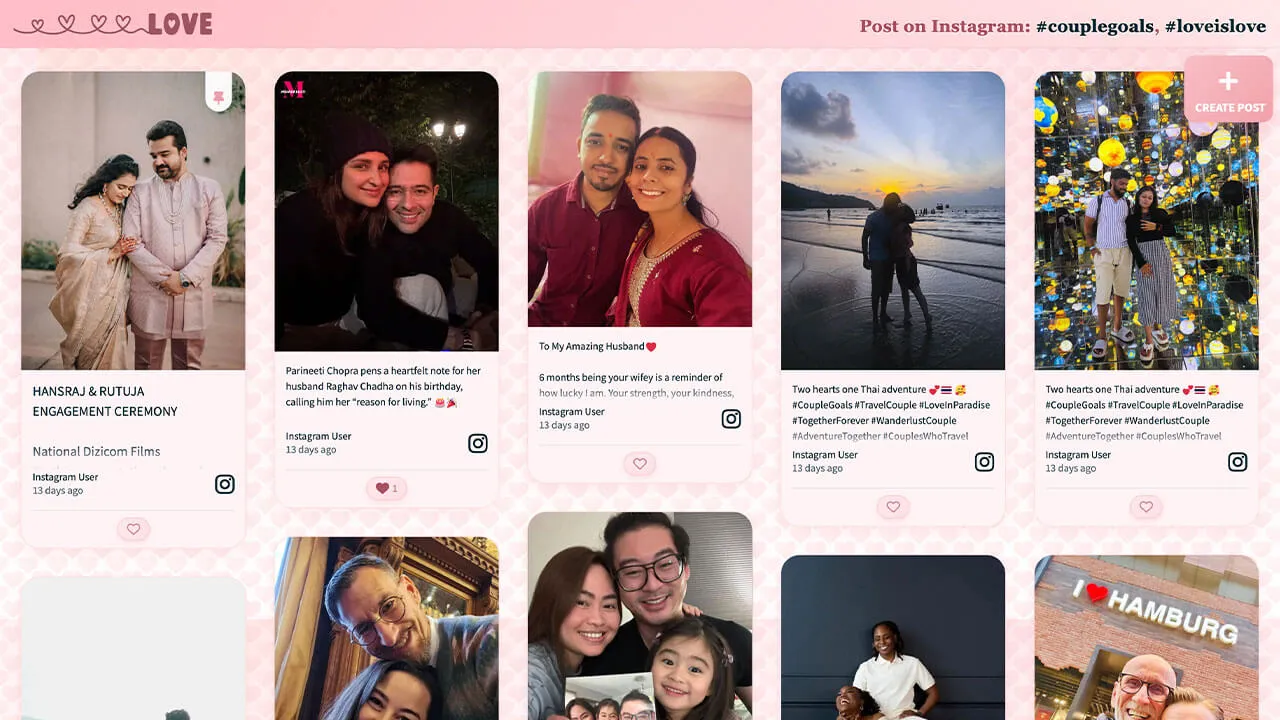
Layout Liebe
Perfekt für den Valentinstag, private Verlobungsfeiern und Hochzeiten.
Highlights der Anpassung:
- Animierter Hintergrund (schwebende Herzen)
- Markenspezifischer Farbverlauf im Header
- Individuelle Pins und Reaction-Buttons
So geht's
Gehe zu Walls.io > Setup > Design.
Zur Wall gehenStelle sicher, dass du das Fluid-Layout und das Farbschema „Light“ ausgewählt hast.
Kopiere den folgenden CSS-Schnipsel in das Feld für benutzerdefiniertes CSS.
/******************************************************
  WALLS.IO — "Amor" Theme
  • Hearts background
  • Light pink opaque posts
  • Text fade
  • Gradient header (white logo fix)
  • Styled pin icon
******************************************************/

/* --- Ensure visibility through embeds --- */
html, body, #app, .app, #wall, .wall, .content, .widget, .widget-body {
  min-height: 100%;
  background-color: #fff6f8;
}

/* === Theme Variables === */
:root {
  --heart-tile: 40px;
  --drift-duration: 90s;
  --header-grad-from: rgba(255,182,193,0.88);
  --header-grad-to: rgba(255,230,230,0.6);
  --instr-color: #a94f60;
  --card-bg: #fff3f5;
  --card-border: rgba(241,160,169,0.3);
  --accent: #f1a0a9;
}

/* === 1) Background (40px subtle hearts) === */
html, body {
  background-image:
    url("data:image/svg+xml;base64,PHN2ZyB4bWxucz0naHR0cDovL3d3dy53My5vcmcvMjAwMC9zdmcnIHdpZHRoPScxMjgnIGhlaWdodD0nMTI4JyB2aWV3Qm94PScwIDAgMTI4IDEyOCc+PGRlZnM+PGxpbmVhckdyYWRpZW50IGlkPSdnJyB4MT0nMCcgeTE9JzAnIHgyPScxJyB5Mj0nMSc+PHN0b3Agb2Zmc2V0PScwJScgc3RvcC1jb2xvcj0nI2ZmYzFjOCcvPjxzdG9wIG9mZnNldD0nMTAwJScgc3RvcC1jb2xvcj0nI2YxNzg4ZCcvPjwvbGluZWFyR3JhZGllbnQ+PC9kZWZzPjxnIGZpbGw9J3VybCgjZyknIGZpbGwtb3BhY2l0eT0nMC4xNSc+PHBhdGggZD0nTTY0IDQwYzgtMTggMzYtMTggNDQgMiA3IDE4LTcgMzItMjEgNDQtOCA3LTE2IDEyLTIzIDE5LTctNi0xNS0xMi0yMy0xOS0xNC0xMi0yOC0yNi0yMS00NCA4LTIwIDM2LTIwIDQ0IDInLz48L2c+PC9zdmc+"),
    url("data:image/svg+xml;base64,PHN2ZyB4bWxucz0naHR0cDovL3d3dy53My5vcmcvMjAwMC9zdmcnIHdpZHRoPScxMjgnIGhlaWdodD0nMTI4JyB2aWV3Qm94PScwIDAgMTI4IDEyOCc+PGRlZnM+PGxpbmVhckdyYWRpZW50IGlkPSdnJyB4MT0nMCcgeTE9JzAnIHgyPScxJyB5Mj0nMSc+PHN0b3Agb2Zmc2V0PScwJScgc3RvcC1jb2xvcj0nI2ZmYzFjOCcvPjxzdG9wIG9mZnNldD0nMTAwJScgc3RvcC1jb2xvcj0nI2YxNzg4ZCcvPjwvbGluZWFyR3JhZGllbnQ+PC9kZWZzPjxnIGZpbGw9J3VybCgjZyknIGZpbGwtb3BhY2l0eT0nMC4xMic+PHBhdGggZD0nTTY0IDQwYzgtMTggMzYtMTggNDQgMiA3IDE4LTcgMzItMjEgNDQtOCA3LTE2IDEyLTIzIDE5LTctNi0xNS0xMi0yMy0xOS0xNC0xMi0yOC0yNi0yMS00NCA4LTIwIDM2LTIwIDQ0IDInLz48L2c+PC9zdmc+"),
    radial-gradient(1200px 800px at 10% 0%, #ffe7e0 0%, transparent 60%),
    radial-gradient(1000px 600px at 90% 10%, #fde2e4 0%, transparent 60%),
    linear-gradient(180deg, #fff1f2 0%, #ffffff 100%);
  background-size:
    var(--heart-tile) var(--heart-tile),
    var(--heart-tile) var(--heart-tile),
    1200px 800px,
    1000px 600px,
    auto;
  background-repeat: repeat, repeat, no-repeat, no-repeat, no-repeat;
  background-position: 0 0, 20px 20px, 10% 0%, 90% 10%, 0 0;
  animation: amorHeartsDrift var(--drift-duration) linear infinite;
}
@keyframes amorHeartsDrift {
  0% { background-position: 0 0, 20px 20px, 10% 0%, 90% 10%, 0 0; }
  100% { background-position: 0 -300px, 20px calc(20px - 300px), 10% 0%, 90% 10%, 0 0; }
}

/* === 2) Header Gradient Fix (.socialwall_header) === */
.socialwall_header {
  background: linear-gradient(135deg, var(--header-grad-from), var(--header-grad-to)) !important;
  backdrop-filter: blur(8px);
  -webkit-backdrop-filter: blur(8px);
  border-bottom: 1px solid rgba(241,160,169,0.3);
  box-shadow: 0 4px 12px rgba(232,93,117,0.08);
  color: var(--instr-color) !important;
  z-index: 2;
}

/* === 3) Post instructions === */
.socialwall_header .post_instructions,
.wallsio-post-prompt,
.wallsio-createpost-prompt,
.createpost-instructions,
.header .instructions {
  font-family: "Playfair Display", Georgia, serif;
  font-size: 1.06rem;
  color: var(--instr-color) !important;
  font-weight: 600;
  text-align: center;
  text-shadow: 0 1px 2px rgba(255,255,255,0.6);
  letter-spacing: 0.3px;
  margin: 0.25rem 0;
}

/* === 4) Post cards (light opaque pink) === */
:root {
  --amor-card-shadow: 0 8px 24px rgba(232,93,117,0.12);
  --amor-radius-xl: 26px;
}
.checkin {
  background: var(--card-bg);
  border: 1px solid var(--card-border);
  border-radius: var(--amor-radius-xl);
  box-shadow: var(--amor-card-shadow);
  margin: 0.6rem;
  overflow: hidden;
  position: relative;
}
.checkin-media,
.checkin .checkin-image,
.checkin .checkin-video { border-radius: calc(var(--amor-radius-xl) - 6px); }
.checkin:hover .checkin-image img,
.checkin:hover .checkin-video video {
  filter: saturate(1.05) contrast(1.04);
  transition: filter .28s ease;
}

/* === 5) Create Post button === */
#createPostButton {
  background: linear-gradient(135deg, #f8bfc6, #f1a0a9);
  color: #fff !important;
  border-radius: 14px;
  border: none;
  box-shadow: 0 8px 18px rgba(232,93,117,0.25);
  transition: transform .2s ease, box-shadow .2s ease;
  margin-right: 12px;
}
#createPostButton:hover {
  transform: translateY(-1px);
  box-shadow: 0 10px 22px rgba(232,93,117,0.3);
}
#createPostButton svg path { fill: #fff !important; }

/* === 6) Like button === */
.like-button {
  background: linear-gradient(135deg, #ffe8ec, #ffdfe6);
  border: 1px solid rgba(241,160,169,0.4);
  color: #a94f60 !important;
  border-radius: 999px;
  padding: 0.35rem 0.75rem;
  font-weight: 600;
  font-size: 0.9rem;
  box-shadow: 0 3px 8px rgba(232,93,117,0.15);
  transition: all 0.2s ease;
}
.like-button:hover {
  background: linear-gradient(135deg, #f9c5cc, #f3a3b2);
  color: #fff !important;
  box-shadow: 0 4px 10px rgba(232,93,117,0.25);
  transform: translateY(-1px);
}
.like-button svg path {
  fill: currentColor !important;
}

/* === 7) Long-text clamp === */
.checkin .checkin-message,
.checkin .checkin-text,
.checkin .checkin-content,
.checkin .checkin-caption {
  display: -webkit-box !important;
  -webkit-line-clamp: 5;
  -webkit-box-orient: vertical;
  overflow: hidden;
  text-overflow: ellipsis;
  white-space: normal;
  line-height: 1.5em;
  max-height: 7.5em;
  position: relative;
}
.checkin .checkin-message::after {
  content: "";
  position: absolute;
  bottom: 0; left: 0; right: 0;
  height: 2em;
  background: linear-gradient(to bottom, rgba(255,255,255,0), var(--card-bg));
}

/* === 8) “No more posts to show” badge === */
.no-more-posts,
.no-more-checkins,
.wallsio-no-more-posts,
.wallsio-feed-end,
.checkins-end,
.timeline-end {
  display: inline-block !important;
  width: auto !important;
  max-width: calc(100% - 2rem);
  margin: 1rem auto !important;
  box-sizing: border-box;
  text-align: center;
  white-space: normal;
  padding: 0.6rem 1rem;
  border-radius: 999px;
  border: 1px dashed rgba(241,160,169,0.55);
  background: rgba(255,255,255,0.7);
  box-shadow: 0 6px 16px rgba(232,93,117,0.12);
  color: #b75a68 !important;
  font-weight: 700;
  letter-spacing: 0.02em;
  line-height: 1.2;
  position: relative;
  left: 50%;
  transform: translateX(-50%);
}
.no-more-posts:empty::after,
.no-more-checkins:empty::after,
.wallsio-no-more-posts:empty::after,
.wallsio-feed-end:empty::after,
.checkins-end:empty::after,
.timeline-end:empty::after {
  content: "No more posts to show";
}

/* === 9) Scrollbar === */
::-webkit-scrollbar { width: 10px; height: 10px; }
::-webkit-scrollbar-thumb {
  background: linear-gradient(180deg, #ffd1d9, #f7a3b1);
  border-radius: 20px;
}
::-webkit-scrollbar-track { background: rgba(255,255,255,.55); }

/* === 10) Header logo (white SVG) === */
.socialwall_header .app-logo.app-logo .image-wrapper svg {
  fill: #fff !important;
  stroke: #fff !important;
  color: #fff !important;
}

/* === 11) Pin icon === */
.checkin-pin-icon svg,
.checkin-pin-icon {
  fill: var(--accent) !important;
  color: var(--accent) !important;
  stroke: var(--accent) !important;
  opacity: 0.95;
  transition: all 0.2s ease;
}
.checkin-pin-icon:hover svg,
.checkin-pin-icon:hover {
  filter: drop-shadow(0 0 4px rgba(241,160,169,0.5));
  transform: scale(1.1);
}

/* Transparent fallback */
#wallsio, .wallsio-embed, .widget, .widget-body, .content {
  background: transparent !important;
}
Branding leicht gemacht
Neben diesen Anpassungen kannst du deiner Wall mit unserem Standard-Design-Editor ganz einfach deinen eigenen Branding-Look verpassen.
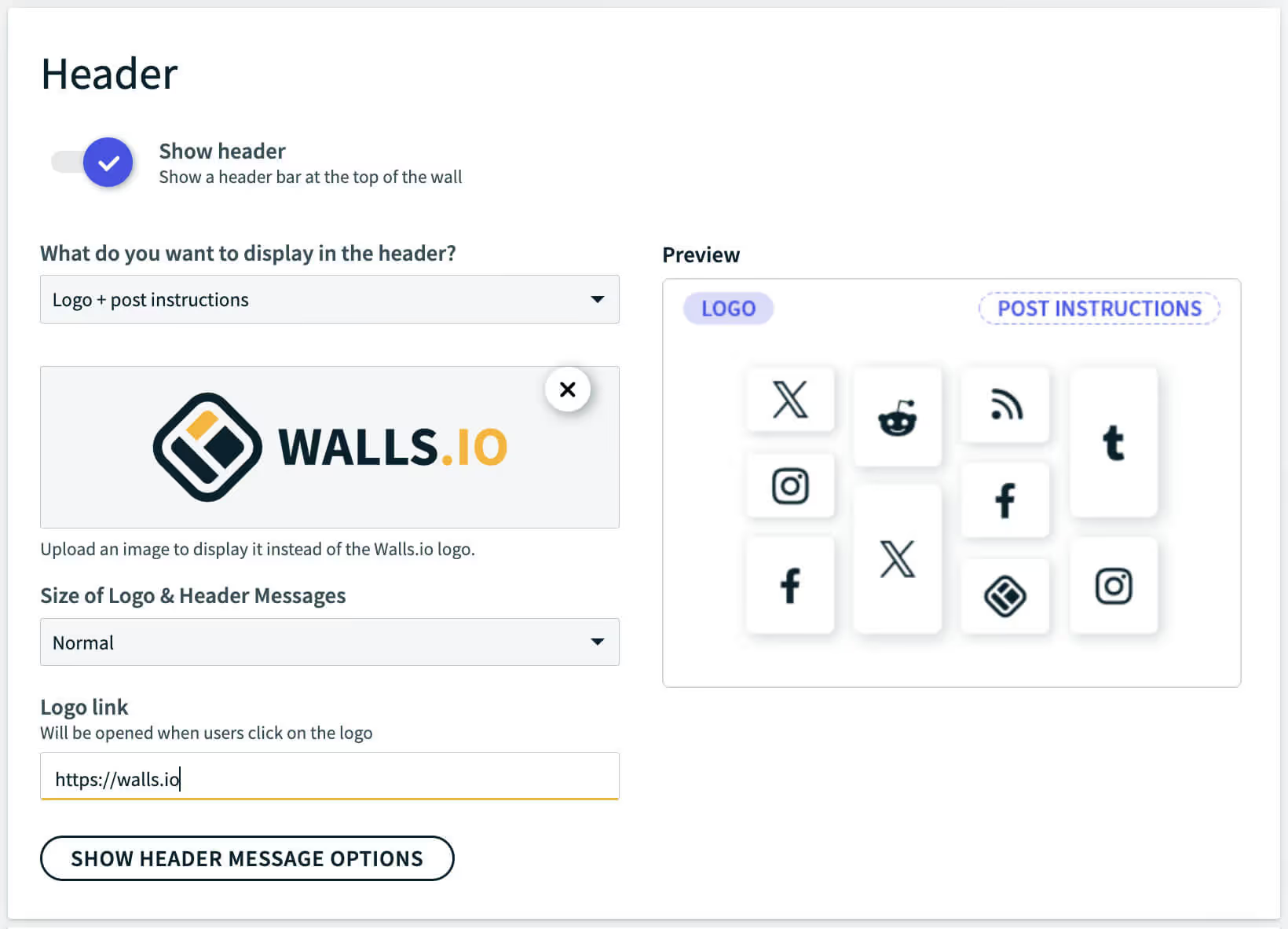
Logo und Link hinzufügen
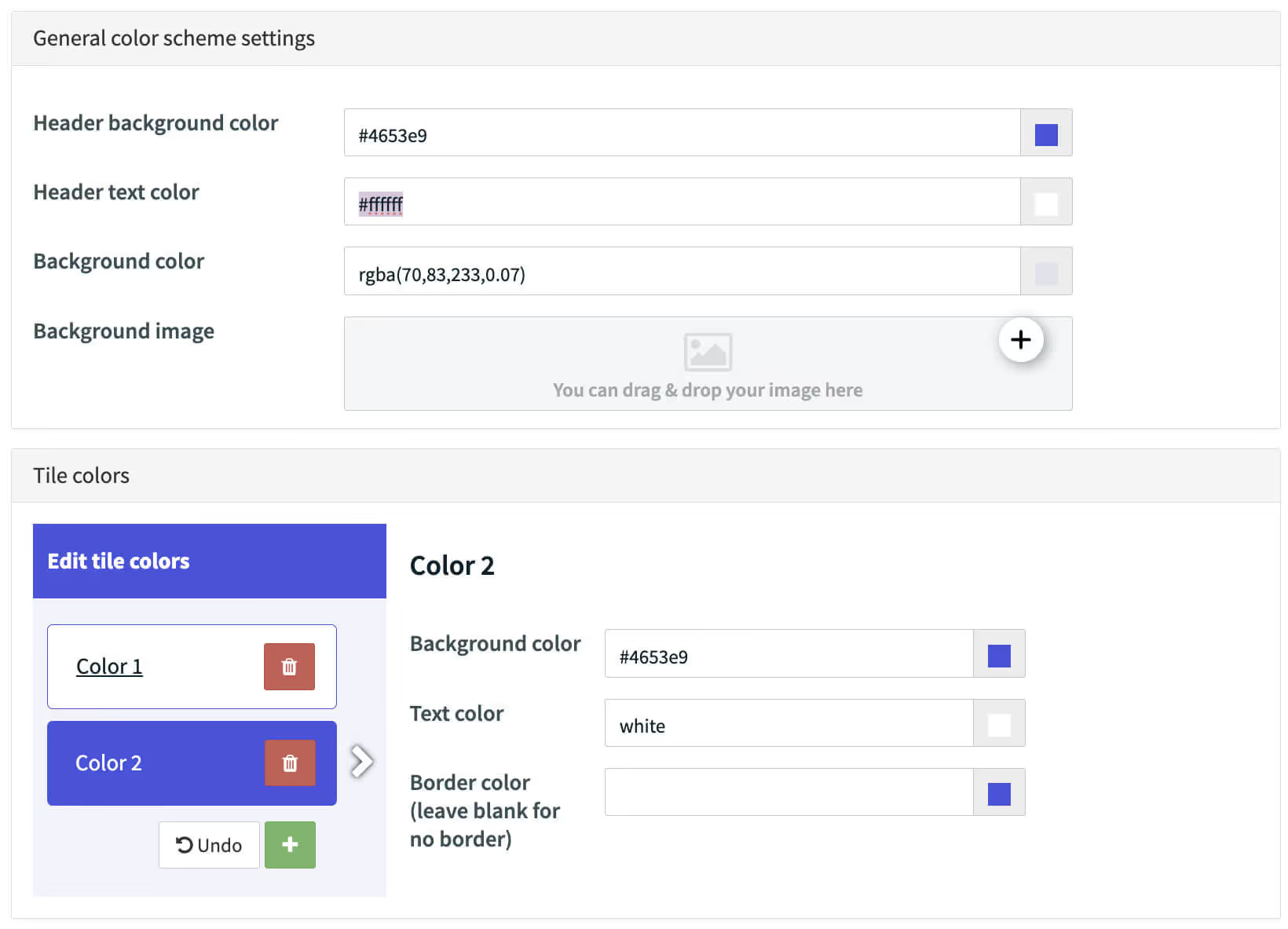
Individuelle Kachelfarben und Header
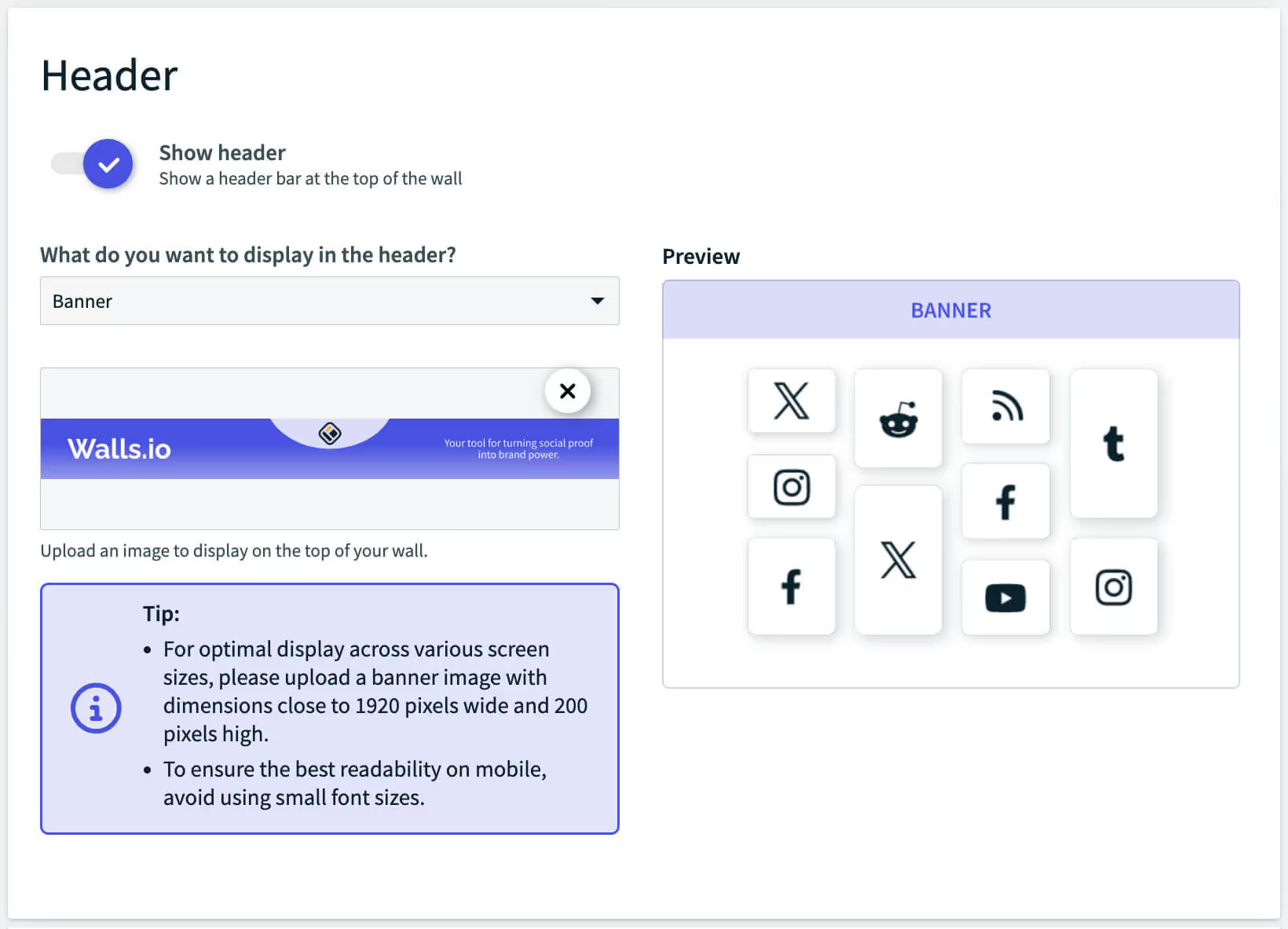
Eigenes Banner hochladen
Hol dir eine persönliche Social-Wall-Demo von unseren Experten


Wir beantworten alle deine Fragen und helfen dir, das beste Setup für deine Marke zu finden. Sprich mit uns – wir zeigen dir gerne alles.