Bring your website to life with a social media feed
Add a social wall for website pages in minutes.
Embed Instagram, LinkedIn, X, TikTok & Facebook feeds as one live social media feed that engages visitors, increases dwell time, and lifts conversions.
No credit card required.

Rated 4.8/5 on G2 for ease of use. GDPR-compliant.


How to embed a social media feed widget on your website. A few use cases to inspire you.
Campaigns
Embed a live social media feed on the website campaigns pages to showcase real-time user-generated content (UGC) and build trust. Pair it with Direct Post feature, which lets people post content directly on a social wall without using social media via a QR code or link, and the Walls.io Lens digital photo booth to collect content your audience shares only with your brand.


Contests
Create UGC contests, collect the entries on a social wall website section, and let visitors vote for their favorites with Reactions, which let visitors engage with posts by reacting to content. Acknowledge the social media posts that earn the most reactions and reward the top contributors.


Mentions
Track brand mentions across networks in real time and surface them as a social media hub on your site. Engage this engaging content on your website to increase trust, decrease bounce rates and keep visitors on your website for longer.



Newsroom
Use a social media wall on website pages as a digital newsroom: display social media content from every channel at a glance, kept up to date automatically. It’s how cities, airports, and corporate teams keep their stories in one place.
.webp)


Social Proof
Embed a social media feed on website product and landing pages to display real customer reviews from Instagram, LinkedIn, X, TikTok, and Facebook. Add Call-to-Action Buttons, which convert viewers into buyers of your product, to turn that social proof into conversions.



Employer Branding
Showcase company culture with a curated social feed on website careers pages or intranets: employee testimonials, workplace news, and highlights pulled straight from your social media channels. This glimpse into the company's culture not only attracts potential employees but also reinforces your brand's image and boosts brand visibility.


All your social media content in
one social media feed
Walls.io aggregates posts from 14+ social media platforms and direct uploads into one customizable feed, so you can embed social media feed content, or embed social media on website pages, without manual work. It pulls from Instagram, LinkedIn, X, TikTok, Facebook, Bluesky, YouTube, RSS and more, working as a hashtag wall and social media aggregator across all your social media channels.


A social media feed built for websites
+14 Content Sources
Aggregate content from over 14 social media platforms and sources to create a dynamic social feed.
Accessibility
Walls.io provides an accessibility-optimized layout that fully complies with WCAG 2.1 Level AA guidelines.
AI Moderation
Keep your social wall professional and on-brand with an AI Spam Filter and AI Sentiment Filters, plus manually approve posts.
Call-to-Action Buttons
Drive engagement by adding interactive buttons that direct users to relevant links on your web page.
Curation
Curation lets you choose and manage the content on your social wall, so your social feed for website stays high-quality and on-brand.
Custom Design
Tailor the look of your social media feed with brand colors, layouts, and themes to match your website and brand identity, enhancing visual appeal.
Direct Posts
Let visitors submit content directly with Direct Posts. No social account is required, so anyone can add to your social media widget.
Live Polls
Increase audience interaction with real-time polls displayed directly on your social wall. Integrate live stream content for events and webinars.
Privacy & Security
With GDPR & CCPA compliance, Walls.io is the most secure social wall, supporting 2FA and complying with EU & US/Californian data protection laws
Digital Photo Booth
Collect branded photos with the Photo Booth that generates branded photos from your audience.
Website Embed
You can show reviews and keep visitors updated: add the feed to any page with one embed code, and the same social media feed embed works on any builder or CMS.
Make your website more engaging
Embed automated social media feeds with Walls.io - easy, interactive, and fully compliant with just a few clicks.
Why Walls.io is the right social wall for your website
Keeping social media embeds secure is a priority
Walls.io keeps your embeds privacy-compliant, aggregating social media on websites from multiple platforms while maintaining security, accessibility, and boosting engagement.
Privacy compliance is essential for your website
Walls.io provides CCPA & GDPR-compliant social media integration, so a social wall for website pages lets visitors view content without logging in, keeping privacy standards high.
Visitors leave your website to engage with content on social media
Walls.io offers in-platform media playback, so visitors watch social videos and view images right on your social media wall on website pages, increasing dwell time and boosting SEO.
Engagement on your website needs improvement
Walls.io lifts engagement by showcasing real, user-generated content on a social media wall for website, keeping visitors on the page longer.
Managing multiple social feeds is overwhelming
Walls.io aggregates content from various sources into one seamless display, reducing manual work while ensuring accessibility and security.
Your website content needs to stay fresh
Walls.io continuously refreshes your social feed on website with new posts, keeping the site active and encouraging return visits, all while staying secure and accessible.
Bring your website to life with social media feeds
Try Walls.io for free and seamlessly integrate dynamic, secure, and privacy-compliant social media content!
How brands leverage social media feeds

.webp)
%20(1).png)
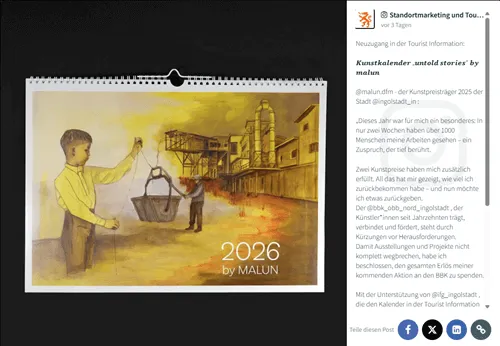
Ingolstadt’s Social Media Newsroom Allows Visitors to Find Out About All Our Social Media Activities at a Glance
Link to "Current" pageThe city of Ingolstadt has been using Walls.io to power up their social media newsroom since 2019. Ingolstadt hasn’t just added official accounts to the social wall but also many other sources. For example, the social media newsroom boasts content posted by the city theatre, a business incubator, the city’s public library, museums, hospitals, the tourist office, and many other cultural institutions, service providers, businesses, and organizational bodies that are connected to the city.

Capture and showcase social proof
Capture UGC through direct posts, hashtags, and branded photo booth content to amplify your brand.
How to create a social wall for website pages
Collect
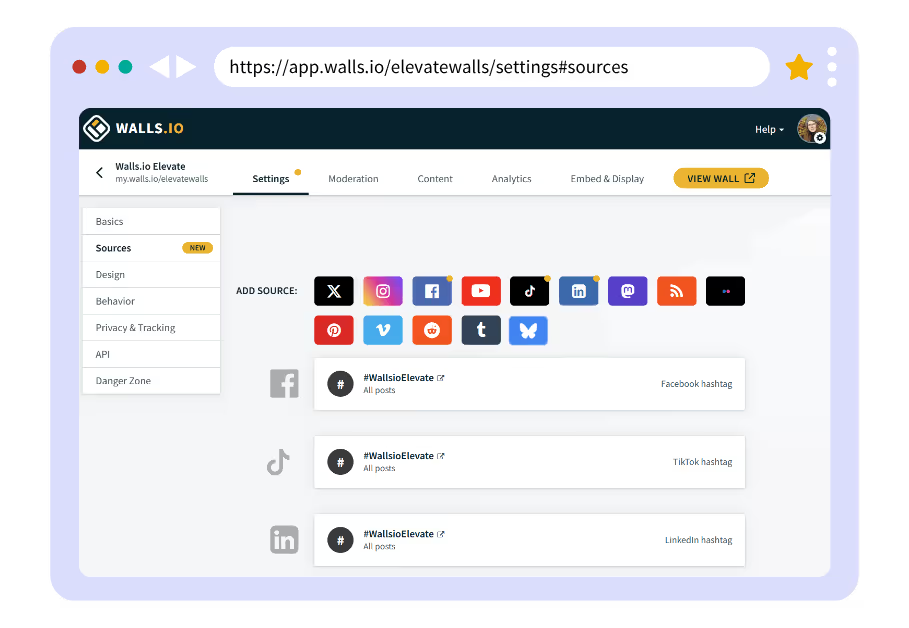
Collect brand and user-generated content from social media channels and other sources.
Curate
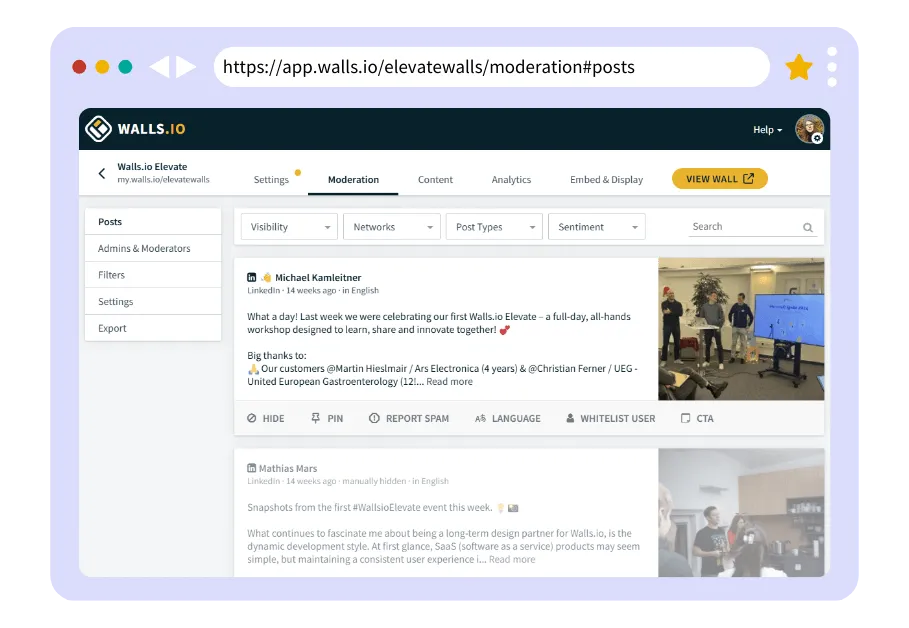
Choose the best content using Walls.io's easy-to-use moderation features to create an engaging social wall.
Display
Choose a layout, apply your branding & embed the feed on a website, or display it on a screen.

Enhance your website with a dynamic social feed
Aggregate content from multiple social platforms and keep your site fresh and engaging with a live feed.
Check out our latest marketing resources

Corporate Event Planning: From Courses to Checklists
Everything you need to know about corporate event planning, from courses to checklists.
%20(1).avif)
Event activations before, during, and after your event
Download our free eBook with 30 activations to keep the energy high from start to end.

How to Embed a YouTube Playlist on a Website
Learn how to turn your website into a branded YouTube hub.
Choose the right plan for your website
Choose the right Walls.io plan for your website, whether you're showcasing social proof, embedding a live hashtag feed, enhancing your newsroom, or adding dynamic content to your landing pages—there’s a perfect solution for every use case.
This social media feed works on any website
Implementing Walls.io on your website is a breeze. No coding needed. It connects to 50+ tools and integrates with popular builders and content management systems, so you paste the iframe or JavaScript code and you’re live.
Follow our step-by-step guides for how to add social media feed to Squarespace, how to add social media feed to Wix, a Webflow social media feed, an Elementor social media feed, or the WordPress social media feed plugin. It also works on Shopify, SharePoint, Notion, Weebly and more, plus an open API for custom builds.

Social media feed
for Active Campaign
You can embed Walls.io on any page of your ActiveCampaign-site.

Social media feed
for Beaver Builder
You can embed Walls.io on your website built with the WP Beaver Builder.

Social media feed
for Elementor
You can add Walls.io to any page by dropping the iframe code in an HTML module.

Social media feed
for Microsoft SharePoint
You can embed a Walls.io social media feed on any SharePoint website.

Social media feed
for Notion
You can embed Walls.io on any Notion page only by pasting your wall’s link.

Social media feed
for Shopify
You can add Walls.io to any page by dropping the iframe code in a custom HTML module.

Social media feed
for Squarespace
It’s easy to add a Walls.io feed to Squarespace by using the iframe code we generate.

Social media feed
for Webflow
You can use the iframe of JavaScript code and Webflow’s “Embed” component to add a social media feed to any page.

Social media feed
for Weebly
Embed the feed by using the Embed Code field. Just drag and drop it onto your page and paste the Walls.io JavaScript code.

Social media feed
for Wix
You can embed a Walls.io social media feed on any Wix website using their Embed Widget and the Walls.io iframe code.

Social media feed
for WordPress
Using our WordPress plugin, you can easily add your Walls.io social media feed to WordPress.
The above are just some of the most popular website builders. Still, you can add the Walls.io social media feed to any website using the Iframe or JavaScript code we generate automatically. You don’t need any coding skills; it’s straightforward. Learn more
Frequently asked questions
How do I add a social media wall to my website?
Sign up, connect your sources, pick a layout, then copy one embed code or URL onto your page. Most users add social media wall to website pages in under 5 minutes, with no code, on any builder or CMS.
How do I embed a social media feed on my website?
Generate the iframe or JavaScript snippet in Walls.io and paste it where you want the feed. You can embed social media feed on website pages, or a social media feed for website section, on any platform, and it updates in real time. You can embed social media wall blocks the same way.
Is there a free social wall for websites?
Walls.io is a premium, enterprise-grade tool, and you can start with a free trial: build and embed social media feed on website free during the trial, with no credit card. Paid plans scale by use case; see website pricing for current rates.
Is there a social media hub solution?
Walls.io works as a complete social media hub, centralizing all your social content in one place to display on your website.
Can I embed social feeds from multiple platforms?
Yes. Combine Instagram, Facebook, X, LinkedIn, TikTok, YouTube, Bluesky, RSS and more into one feed, so a single widget shows content from all your social accounts.
Which tool is best for integrating social media feeds into a website?
Walls.io is rated 4.8/5 on G2 and trusted by 9,000+ brands. It aggregates 14+ sources, adds AI moderation and custom design, and is GDPR/CCPA compliant, which makes it a strong fit for integrating social media feeds into a website.
Is there a social wall plugin or widget for my website?
Yes. Use our WordPress social media feed plugin, or the universal embed code, which works as a social media widget for website pages on any builder or CMS.
What is a social media feed widget?
It’s a tool that displays posts from multiple accounts as one gallery, a social media feed widget for website visitors. See our social media feed FAQ for setup steps.