How do I embed my LinkedIn profile on a website?
Quick Answer
To embed a static, single post from your LinkedIn profile on a website, create a public profile badge in your LinkedIn settings and paste the script into your site's HTML. If you want to combine multiple LinkedIn profiles or need an employee profile feed for your company website, an aggregator tool like Walls.io can gather public LinkedIn profile posts, organize them, and embed them as a live feed.

Definition and context
You can add a LinkedIn profile to your website. This means that visitors will see LinkedIn content on your website without leaving the site. There are two ways to do this. The first is LinkedIn's free public profile badge, which is a static card for one person. The second is pulling the public posts on LinkedIn, organizing them, and embedding them as a feed for a company's profile. You need to choose the one that's right for you. It depends on whether you're showing a single profile or many.
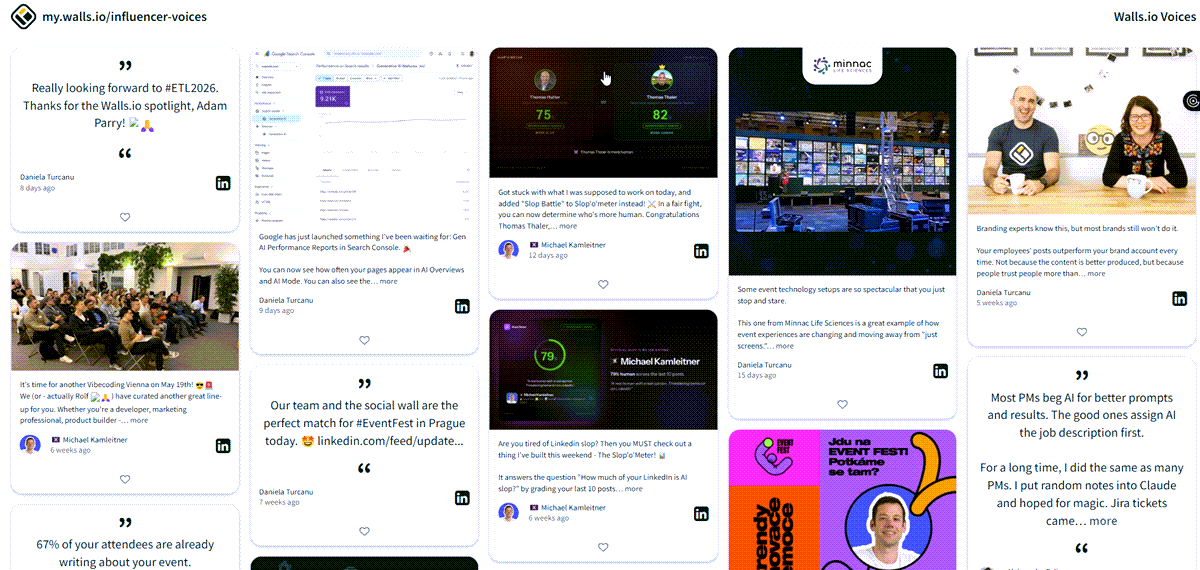
How to embed LinkedIn profiles with automatic content updates
Each badge is for one person. When you're trying to make your company more attractive to potential employees or to get your current employees talking to each other, you want a lot of different people to share their ideas. That's a different job: pulling public LinkedIn content, organizing it, and embedding it as a branded feed.
Here's how it works with a content tool like Walls.io. It collects LinkedIn content from public profiles, pages, hashtags, and keywords, so posts from employees and leadership are all in one place. You can choose the posts you want to see first, hide the ones you don't, and save the best ones to the top. You can personalize your feed design to match your brand's identity. This makes the feed look like your site instead of a generic widget. The website embed feature lets you show reviews and keep visitors updated. It places them on a careers page, microsite, or intranet, where they refresh on their own.
Because the content is already public and you choose what appears, the feed stays brand-safe. Walls.io is also GDPR & CCPA compliant, the most secure social wall supporting 2FA and complying with EU and US data protection laws, EU-hosted with a DPA out of the box, so IT and legal sign off without a drawn-out review.
When does embedding LinkedIn profile content work best?
This is the setup that most teams use, and it's really effective:
- Employer branding: Real employee posts on a careers page are better than stock photos and videos. Candidates trust people more than brand copy.
- Internal communications and the intranet: Share LinkedIn culture posts on the intranet so headquarters and frontline staff see the same story, including people who don't post on social media.
- Campaigns and launches: Collect profile and hashtag posts during a specific moment, organize them live, and keep the page moving.
- Leadership and corporate influencers: Feature executive posts in one branded place instead of scattered links.
How Walls.io approaches this
Walls.io collects publicly shared posts from LinkedIn profiles, pages, and hashtags. Then, it lets you organize, brand, and publish them through Website Embed. You select the posts, customize them to match your brand, and add the feed to a careers page, website, or intranet. It's the setup we use most often for employer branding and internal communications. See how it works →
Resources
→ Embed a LinkedIn Feed on Website: The Complete Guide
→ LV 1871 Corporate Influencer Social Wall
→ Social Media Feed on Website Examples & How To
Related questions
→ What is a social media aggregator?
→ How do I embed a social media feed on a website?
→ How do I set up a live social media wall for an event?